Color sequence and stitch length dialog box (Jacquards)
You make the following settings in the 颜色顺序和线圈长度 dialog box:
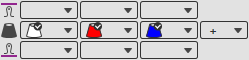
- Change the color sequence by moving the system using drag-and-drop. For this proceed as follows:
Lead the mouse using the corresponding system. The button: appears above the system. Using drag-and-drop on this button you move the system and change the color sequence.
 - Change the colors in the respective selection list.
- You can add an additional color via the
 button.
Added colors are marked by .
.
You can remove them again in the context menu of an added color. - The stitch lengths for the front
 and back
  are displayed and changed in the respective selection boxes. When you have selected the stitch lengths from the pattern, then the selection boxes remain empty.
 -
 第二颜色顺序
If you have selected a 第二颜色顺序, appears the following graphic under it where you can change the colors and the color sequence:
带有当前提花的花型

The patterns where the selected Jacquard is used, are displayed.
|
|
创建花型内提花副本
|
|
|
删除花型内提花 |

 By default, the Jacquard areas with the same Jacquard module and the exact same colors are grouped.
Pattern Elements with Current Jacquard

The pattern elements where the selected Jacquard is used, are displayed.
|
|
创建花型元素内提花副本 |
|
|
删除花型元素内提花 |
