Context Menu on a Marking Point
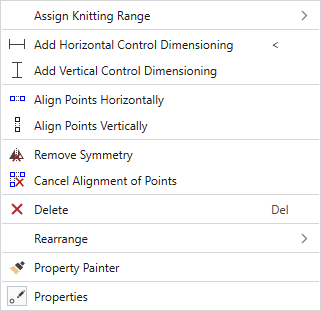
|
分配编织范围 |
Adds a knitting area to the marking point. |
|
|
添加一个横向控制尺寸标注。 Control dimensions can be defined between any two markings in the shape. The measure is entered in cm. |
|
|
添加一个纵向控制尺寸标注。 Control dimensions can be defined between any two markings in the shape. The measure is entered in cm. |
|
|
在同样高度,保持两个或两个以上点横向排列。 按照提示进行操作! |
|
|
在同样宽度,保持两个或两个以上点纵向排列。 按照提示进行操作! |
|
|
点击取消点对称。 Not available with marking points of a shape line. |
|
|
取消纵向或横向对齐排列。 点击所需点。 |
|
|
在视图里点击一个对象来将其删除。 |
|
重新安排 |
Select a new arrangement of the marking point from the offered options. Not available with marking points of a shape line. |
|
|
点击复制对象(模型线或标记点)的属性并转移到接下来点击的对象上。 Not available with marking points of a shape line. |
|
|
显示带标记点属性的工具窗口。 Not available with marking points of a shape line. |


