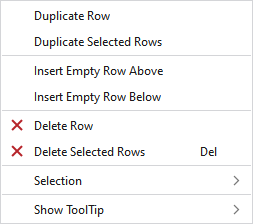
Context menu of the control column of the pattern rows
In the context menu on these control columns you have the following options:
|
复制行 |
Duplicated the row under the cursor. | |
|
复制所选行 |
Duplicates the selected rows. | |
|
上方插入空行 |
Enters an empty row above the clicked row. | |
|
下方插入空行 |
Enters a row under the clicked row. | |
|
|
Deletes the row at the cursor position. | |
|
|
Deletes all the selected rows. | |
|
选择 |
创建提花... |
I. Generate a Jacquard area in the selected area.
|
|
|
Create a pattern element from the selection. 根据现有选择区域创建一个新的花型元素,然后将其添加到“花型元素”工具窗口。 | |
|
Select |
The functions of the menu bar 选择 are also available in the context menu. | |
|
保护 |
A selection can be protected from interventions. | |
|
显示工具提示
| ||


