Example 7: Color Arrangement with additional rows
With this Color Arrangement CA7 there are to be inserted additional pattern rows into an existing design pattern (basis).
 : Additional rows are pattern rows / technical rows, that are not available in the design pattern (source pattern).
Additional rows can contain:
- Needle action for knitting + color from the Pattern Colors tool window
- Needle actions Transfer, Cast-off or Post loop sinking (i.e. needle actions without yarn carrier)
Create the Color Arrangement CA7:
- The pattern project of pattern Pattern-7 is open.
- Pattern in
 设计花型 is active.
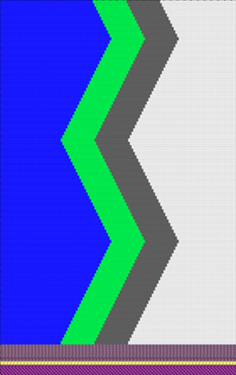 : Colors from the 纱线颜色 table were used to draw the basic pattern.
- 1
- If necessary, save the pattern project under a new name.
- 2
- In the 花型行 control column, select the first 2 pattern rows.
- 3
- Position the cursor in the pattern area.
- 4
- Open the context menu and select 选择 /
 颜色排列.
颜色排列.
- or -
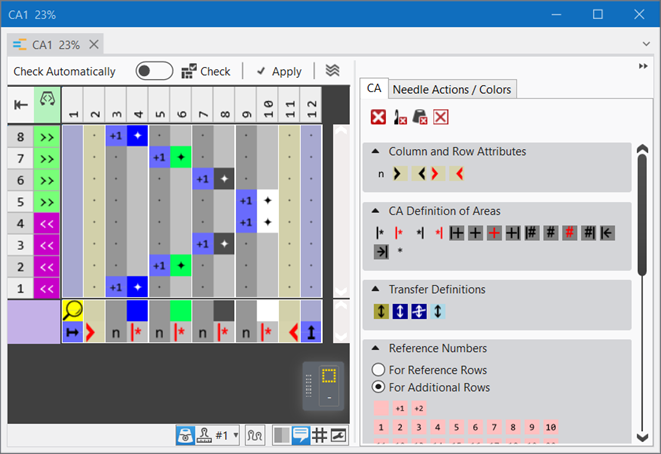
Click directly the button in the ribbon. - The Color Arrangement Editor with the original 'Default knitting process' of the 2 selected pattern rows is opened.
|
|
|
|
|
Result after technical processing
|
|
|
|
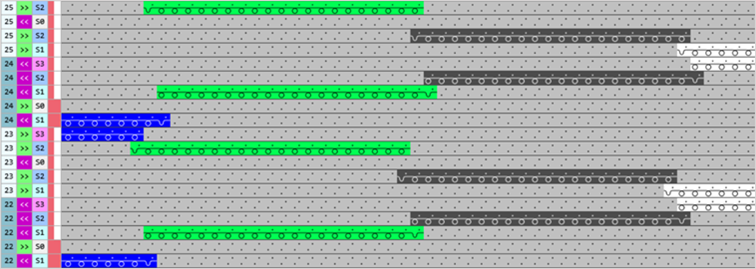
The colors (= yarn carrier) from the 'processing area' of the CA are processed according to the number of knitting systems of the selected machine.
|
 symbol (default entry) repeats the needle action from the source row in the entire color area from the left to the right
 symbol, the corresponding needle action from the source row of the design pattern is read out and knitted according to the search color.
- 5
- Position the cursor on the column selection bar.
- 6
- Select the color column in the color segment of the yarn color #5 (green) with LMB.
- 7
- Position the cursor at the position ((1)).
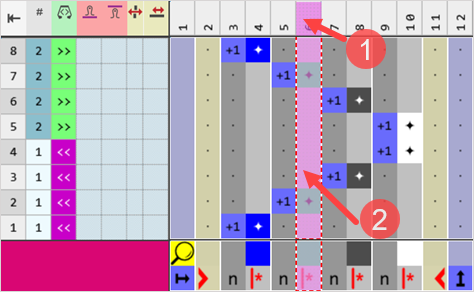
: At the cursor position (2), the RMB opens the context menu only to work with color segments.
- 8
- Open the context menu with RMB.
- The context menu appears.
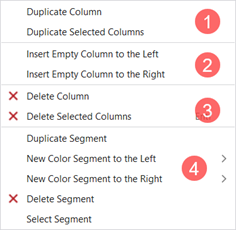
|
1 |
复制列 |
Copy content of the selected column | |
|
复制所选列 |
Copy content of the selected column(s)
| ||
|
2 |
左侧插入空列 |
Insertion of columns to the left of the selected column | |
|
右侧插入空列 |
Insertion of columns to the right of the selected column | ||
|
3 |
|
Delete Column |
Without selection delete a column |
|
|
Delete Selected Column |
With selection delete a column
| |
|
4 |
Options to work with color segments | ||

|
4 |
Options to work with color segments | |||
|
复制区段 |
| |||
|
左侧新颜色段 |
> |
Menu for the selection of the quantity of color segments to be inserted (1-10) to the left in relation to the selection | ||
|
右侧新颜色段 |
> |
Menu for the selection of the quantity of color segments to be inserted (1-10) to the right in relation to the selection | ||
|
|
删除区段 |
| ||
|
选择片段 |
The color segment at the cursor position is selected | |||
- 9
- Insert / duplicate the desired number of columns to the left or right in relation to the selected column of the yarn color #5.
- For example:
- 1 additional column for the structure of the application: Any quantity of columns is available.
- 2 additional columns for the edge of the color field
- 10
- Select the desired row in the CA.
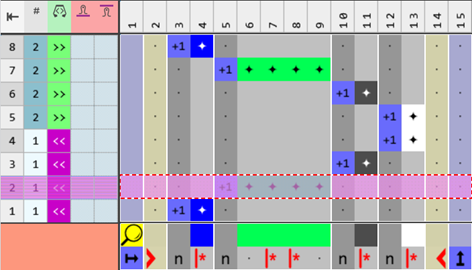
- 11
- Number of needed rows inserted additionally:
- For example:
- 6 additional rows for the structure of the application: Any quantity of rows is available.
- 12
- Draw the desired structure for the application and the edge of the color field in the color segment of the yarn color #5 (green) in the 'Processing area':
- in the source row
- in the additional rows: Color + needle action
- 13
- In the tool window of the CA editor change to the 织针动作 / 颜色 tab.
- 14
- Select the desired needle actions to draw.
- For example:
- 前板线圈 - 后板线圈
- 前板线圈
- 浮线
- 15
- In the 'Search area' in the columns for the edge of the color field, define 'no entry'.
- 16
- In the tool window of the CA editor change to the 颜色排列 tab.
- 17
- In the 基准号码 section select
 用于辅助行.
 - 18
- In the 'Reference column with reference numbers' of the inserted rows, insert the
 symbol.
Meaning of the reference numbers in the additional rows:
Reference number for additional rows (pink symbol) for the use of not knitting and / or knitting additional rows in the CA (no corresponding source row available in the design pattern)Exception:
All CA’s, created from areas with STOLL Jacquard modules, will be defined as additional row starting from the 2nd Jacquard color.: No information from the control columns is applied.
Exception: Stitch lengths at front and rear
- Working with numbers ,
 , and
, and  : When using these numbers there is no reference to a row from the source pattern. Using the '+' symbol, the additional rows are also increased and are inserted additionally after the corresponding source row.
 - Working with the numbers from
 to
to  and bigger: When using these numbers there is a fixed reference to a row from the source pattern after which the additional row is inserted in the design pattern.
|
Content of additional rows |
Properties and Behavior |
|---|---|
|
With yarn color or yarn carrier color |
You have to draw-in a knitting needle action if you enter additional rows with Yarn Color or Yarn Carrier Color into a color column. |
|
Without yarn color or yarn carrier color |
You have to draw in a Transfer, Cast-off or Loop sinking needle action (not knitting) if you enter additional rows without Yarn Color or Yarn Carrier Color into a color column. |
|
Behavior:
| |
|
Example CA7-1: Structure for the application and the edge of the color field in the color segment of the yarn color #5 (green) |
|
|
|
|
|
Example CA7-2: Structure for the application and the edge of the color field in the color segment of the yarn color #5 (green)
|
|
|
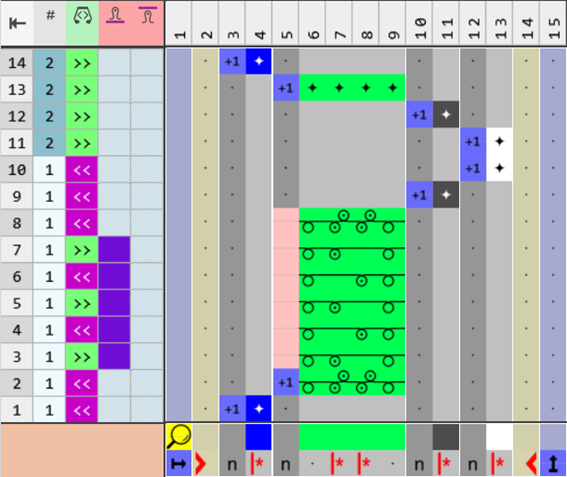
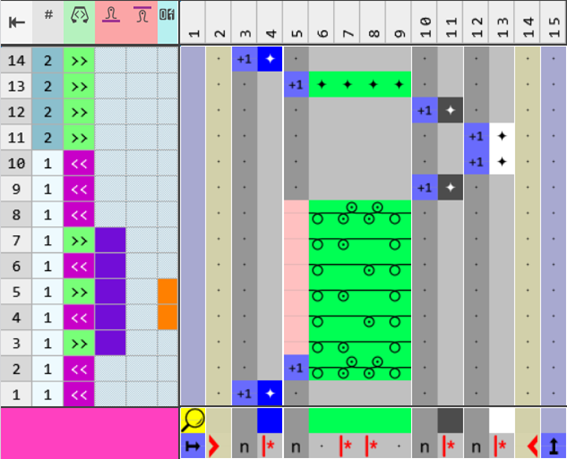
- 19
- Check the generated Color Arrangement on correct entries with the
 检验 button.: The knitting procedure cannot be checked!
 - 20
- If necessary, in case of a Color Arrangement already used in the design pattern, apply the changes to the basic pattern with the
 应用 button.
- or -
Close the tool window with button.
 - 21
- Close the prompt with the desired button:
-
Save: Color Arrangement is saved locally in the
 颜色排列 tool window.
 - Reject: The changes will not be saved.
-
Copy: The changed Color Arrangement is saved as copy in the 颜色排列 tool window.
- 22
- Enter the generated Color Arrangement via the
 control column into the desired rows of the design pattern.
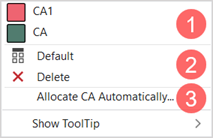
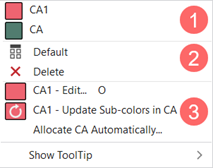
Options to enter the Color Arrangement in the 'Color Arrangement' control column:
- Select the desired CA in the tool window in the 颜色排列 tab
-
Color Arrangement control column: Open the context menu with RMB.
|
| ||
|
1 |
List of all generated Color Arrangements in the pattern project
| |
|
2 |
|
CA entry is replaced with the default setting |
|
|
CA entry is deleted | |
|
3 |
Assign Color Arrangements Automatically
| |

|
| ||
|
1 |
List of all generated Color Arrangements in the pattern project
| |
|
2 |
|
CA entry is replaced with the default setting |
|
|
CA entry is deleted | |
|
3 |
CA1 - Edit...
| |
|
CA1 - Update sub-colors in CA
| ||
|
自动分配颜色排列
| ||
- 23
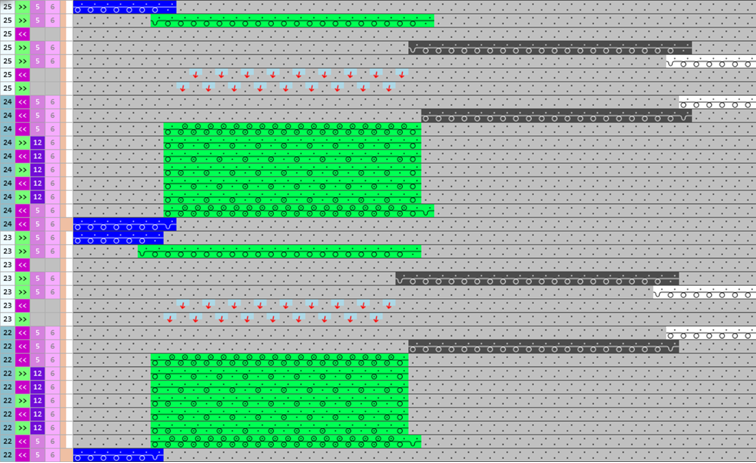
-
 Start Technical Processing
 - The Color Arrangement is expanded by the technical processing.
|
Result after technical processing |
|
|
|
- 24
- Generate
 Sintral.
 - 25
- Start the
 Sintral 检验.
 - 26
-
 提取 the knitting program.
 - 27
- Load knitting program into the machine.