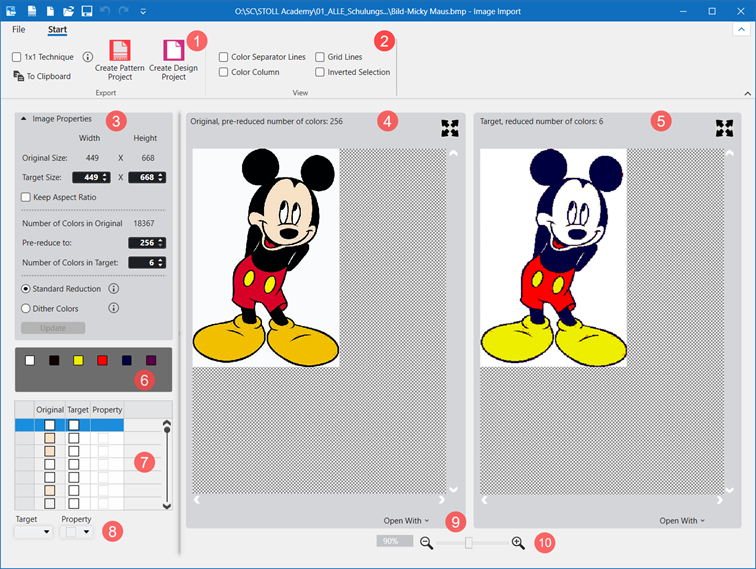
Image Import dialog box
Working with the Image Import dialog box
Options to open the dialog box
- In the start window of Create Plus -> start
 导入图片
导入图片 - In the pattern project -> over 文件 -> 导入 -> 导入图片
Importing an image:
- 1
- Start the program double-clicking
 .
. - 2
- Click 导入图片 in the start page under Start.
- or -
In the started CREATE PLUS, in the 文件 ribbon, 导入 tab, select 导入图片. - The Image import dialog box is opened without display of an image.
- 3
- Select and open the path of the desired image in the 文件 ribbon over 打开.
 : The following formats can be read: bmp, jpg, jpeg, jpe, jfif, gif, tiff, tif, png
 - The image reduced by the default settings is displayed in the dialog box under 目标 and the original one under 原始.
|
| |||||
|
Start ribbon | |||||
|
1 |
Group 导出 | ||||
|
|
1x1 方式 |
The image will be doubled in the width (1x1 technique).
This affects the insertion of the image! | |||
|
|
到剪贴板 |
The edited image is copied to the clipboard.
| |||
|
|
创建花型项目 |
A pattern project with a design pattern is opened from an edited image. | |||
|
|
创建设计项目 |
A design project with a design pattern is opened from an edited image. | |||
|
2 |
Group 视图
| ||||
|
|
颜色分割线 |
Display of the 目标,减色数: view of colored separating lines for subdividing the different areas with different quantity of colors | |||
|
|
网格线 |
Display of a grid in the 目标,减色数: view | |||
|
|
颜色列 |
Display of an additional column in the 目标,减色数: view with the existing colors in each case. | |||
|
|
反向选择 |
Display of the selected color
| |||
|
3 |
图像属性 | ||||
|
原始尺寸: |
Display of the original size of the image in width x height | ||||
|
目标尺寸: |
Edit boxes for the size of the target in width x height | ||||
|
|
保持纵横比 |
|
Size of the image freely changeable in width and height. | ||
|
|
Size of the image changeable depending on the aspect ratio. | ||||
|
原始颜色数量 |
Original quantity of colors in the original image | ||||
|
预减至: |
Entry of the quantity of colors to which the image is to be reduced when loading it.
| ||||
|
目标颜色数: |
Entry of the quantity of colors for reducing the 原始 to 目标 | ||||
|
|
Type of reduction of an image, e.g. for Jacquard | ||||
|
|
Type of reduction of an image with smooth color transitions, e.g. for photos | ||||
|
更新 |
Apply changes of the settings | ||||
|
4 |
Display of the 原始 with already previously reduced number of colors | ||||
|
5 |
Display of the 目标 image with the specified quantity of colors | ||||
|
6 |
| ||||
|
7 |
Table with the following columns | ||||
|
原始 |
Quantity of colors which were entered at 预减至:. | ||||
|
目标 |
Allocation of a target color to a original color
| ||||
|
属性 |
|
Allocate 'outside shape' to one or more selected target colors.
| |||
|
|
One or more selected target colors are imported as color in the CPS.
| ||||
|
|
Allocate 透明 to one or more selected target colors.
| ||||
|
8 |
目标 |
Selection of the target color for the allocation of a property | |||
|
属性 |
Selection of the desired property for the selected target color | ||||
|
9 |
打开方式 |
Open the original or the target in an image editing app to make changes | |||
|
10 |
缩放 |
Zoom display | |||