Step by Step to Pattern-8
- A pattern project with one pattern and the desired settings is created.
- The image was reduced to 3 colors in the 图像导入 dialog box and was saved on the clipboard as a pattern element.
- 1
- Select the
 tab in the 花型元素 tool window.
 - 2
- Position the cursor in the tool window.
- 3
- Open the context menu with RMB.
- 4
- Using Insert (Ctrl+V) save the image from the clipboard in the tool window.
- Image with name and image size is displayed.
- 5
- Select image.
 : Modify the pattern element (image), if desired, to avoid unnecessary knit-in and knit-out rows!
- 6
- Position image in the
 设计花型.
设计花型.
: If necessary for the better positioning of the image, save the shape in advance in 设计花型 (floating).
- 7
- To create a project-related lined shape, in the tool window change to the
 模型 tab.
 - 8
- Open the context menu with RMB and select 创建 M 码新模型....
- The 新线模型 tool window is opened.
- 9
- Make the desired entries:
- 模型名称: Any
- 输入格式: Stitch
- 10
- Confirm with the OK key.
- The new lined shape (basic shape) is graphically displayed in the 模型 tab and in a new document window
 as rectangle.
: Default attributes are used for the shape edges of the lined shape.
Menu 文件 -> 选项 -> 线模型 -> 新建线模型选项
- 11
- To create a lined shape based on the displayed rectangle in the ribbon 模型编辑 under 属性, click the 线表 button.
- or -
Use the graphic displayed in the document window.
: The method (table or graphic) to create a project-related lined shape is freely eligible, since the views are always updated simultaneously.
- 12
- Insert new shape lines in the table and enter the desired values for the basic shape.
- Standard attributes from configuration are assigned to those shape lines.
Example: Lined shape for Pattern-8
|
Basic Shape: Front without neckline |
|
|
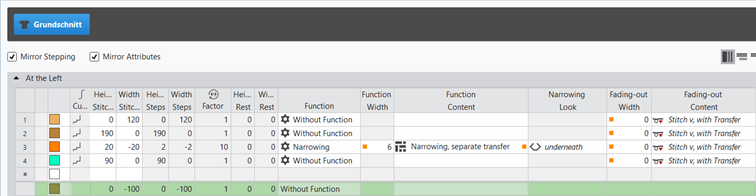
Rules for creating a shape for the knitting mode SJ:
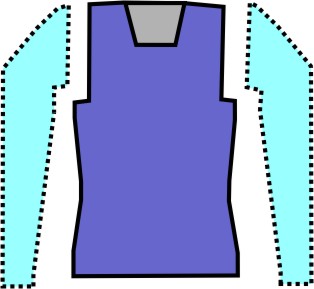
Example Front:
|
Shape Attributes |
Rules / possible settings |
|---|---|
|
Knitting Mode: |
Single Jersey |
|
Step width of widening |
1 needle (stitch) per knitting row |
|
Step height of widening |
As desired |
|
Quantity of rows without shape modification |
As desired |
|
Step width when narrowing |
1 - 3 needles (stitches) |
|
Step height when narrowing |
As desired |
|
Fading-out Width |
As desired |
|
Knitting mode for fading-out |
Front Stitch with Transfer |
|
Binding-off width: |
Stepping > 3 stitches |
|
Binding-off methods |
Binding-off, Structure, Single Jersey
|
- 13
- Allocate the desired attributes to the shape lines of the shape.
- 14
- In the 模型 tool window select the created shape with LMB.
- 15
- Open the context menu -> 定位模型 -> select Pattern name.
- The shape is floating in the 设计花型.
- 16
- To position the shape in the Editing Layers user control, change from the
 编辑基本层 to the
  编辑线模型 (Y).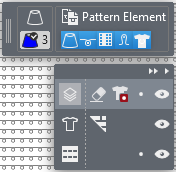
- 17
- If necessary, use
 to position the floating shape in the 设计花型.
 - 18
- Using the Editing Layers user control, change back from the 编辑线模型 (Y) to the 编辑基本层.
- 19
- In the
 control column, create a row selection over the whole height of the image.
 - 20
- Position cursor in the image area.
- 21
- Open the context menu with RMB.
- 22
- Under 选择 -> select 创建提花....
- The 创建提花 dialog box appears.
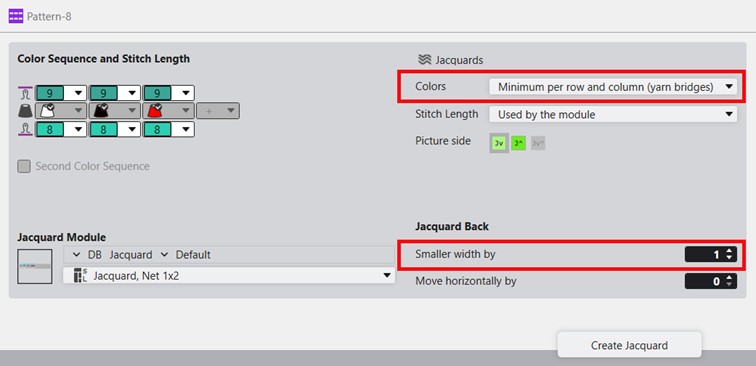
- 23
- Make the desired settings:
- 提花模块
- Desired Jacquard module for the fabric back
-
 提花
提花 -
颜色: 每行和每列最少数量(跳纱) : Jacquard module will only be inserted in the area of the motif.
- 提花背面:
-
减小宽度 : Number of needles by which the rear side is inserted narrower on each side compared to the image front.
- 线圈长度:
-
模块使用 : Presets for stitch lengths are entered from the module of the Jacquard module in the design pattern.
- 24
- Apply the presets with the 创建提花 button into the design pattern.
- The selected Jacquard module is displayed in the 设计花型.
- 25
- For further presets, open the dialog box in the ribbon under 配置 ->
 配置.
配置. - 26
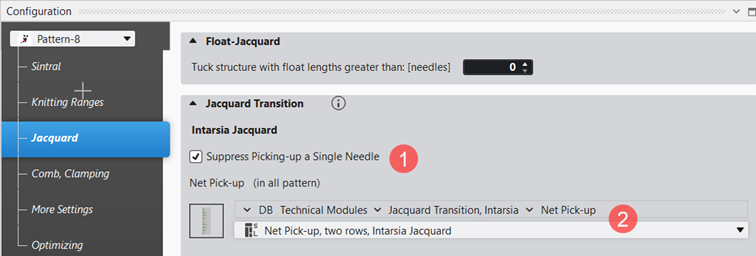
- In the 配置 dialog box, select the 提花 tab.
- 27
- Under the 提花过渡 -> 嵌花提花 section, make the desired settings.
|
| ||
|
1 |
忽略一针起针 | |
|
|
Default Setting
| |
|
|
With Jacquard rows where the rear side starts with only one needle, the selected technical module for the net pick-up is entered. | |
|
2 |
Selection of the desired technical module for net pick-up. | |


- 28
- Open the 导纱器 tool window to edit the presets for the yarn carriers.
- 29
- In the 颜色参数 table make the desired changes in the following groups:
- 编织带入和带出
- 嵌花锁定
- 30
- Make the desired changes in the following control columns:
- 线圈长度 (NP)
- 主牵拉(WMF)
- 速度 (MSEC)
- 31
- Start the
 工艺
处理.
工艺
处理. - 32
- Generate
 Sintral.
 - 33
- Execute
 Sintral 检验.
 - 34
-
 提取 the knitting program.
 - A program for the knitting machine will be created: CMS530.Pattern-8.zip
- 35
- Load knitting program into the machine.
 : The extracted file CMS530.Pattern-8.zip can be loaded onto the machine with an USB stick or via Ethernet.