Create a New Dimensioned Shape
- The measure unit cm is set.
- The reference unit for the stitch density is 10.0 cm.
How to Define the Options for New Shapes - On the Start page under the New Dimensioned Shape section in the left detail column select the basic shape type
 Raglan.
- The possible settings for the selected shape type appear in the middle detail column.
- Select the Crew Neck option in the Neckline and Opening
 list box.
- Select the Center of Back option in the Seam Position of Collar list box.
Seam Position of Collar - Select the Only Widening or Narrowing option in the Waist list box.
- Select the Upright to Body Center option in the Dimensioning of the Armhole list box.
- Select the Up to the Body Center option in the Dimensioning of the Sleeve Length: list box.
- Keep the specified values for width and height of the stitch density in the Pattern group box of the right detail column.
- Select the Stitch v, with Transfer needle action in the list box Filling Element.
- Enter the value 77 in the Waistband of Body group box under Stitch Density [10 cm] in the edit box for the Width
 .
.
- Enter the value 115 in the edit box for the Height by Rows.
- Activate the
 Knitting Element for the Start check box.
- The options for the waistband of the body appear.
- Select Start, 3x3 in the Start module list box.
- Select the option 1 System in the Number of Systems list box.
- Select the option With elastic thread at the rear in the Elastic Thread list box.
- Select the option With protection yarn in the Protection Yarn list box.
- Select the option Loose row in the Transition list box.
- Select the Fair Isle + Doubling, Stitch v module in the Doubling list box.
- Enter the value 77 in the edit box for the Width under Stitch Density [10 cm] of the Cuff of Sleeve group box.
- Enter the value 115 in the edit box for the Height by Rows.
- Activate the Knitting Element for the Start check box.
- Select Start, 3x3 in the Start module list box.
- Select the option 1 System in the Number of Systems list box.
- Select the option With elastic thread at the rear in the Elastic Thread list box.
- Select the option With protection yarn in the Protection Yarn list box.
- Select the option Loose row in the Transition list box.
- Select the Fair Isle + Doubling, Stitch v module in the Doubling list box.
- Enter the value 77 in the edit box for the Width in the Collar and Trimming group box under Stitch Density of the Start [10 cm].
- Enter the value 115 in the edit box for the Height by Rows.
- Enter the value 59 under Stitch Density within Trimming [10 cm] in the edit box for Width.
- Enter the value 81 in the edit box for the Height by Rows.
- Select the Stitch v, with Transfer needle action in the list box Filling Element.
- Activate the Knitting Element for the Start check box.
- Select Start, 3x3 in the Start module list box.
- Select the option 1 System in the Number of Systems list box.
- Select the option With elastic thread at the rear in the Elastic Thread list box.
- Select the option With protection yarn in the Protection Yarn list box.
- Select the option Loose row in the Transition list box.
- Select the Fair Isle + Doubling, Stitch v module in the Doubling list box.
- Click the Create Dimensioned Shape button.
- The dimensioned shape appears in the Dimensioning View.
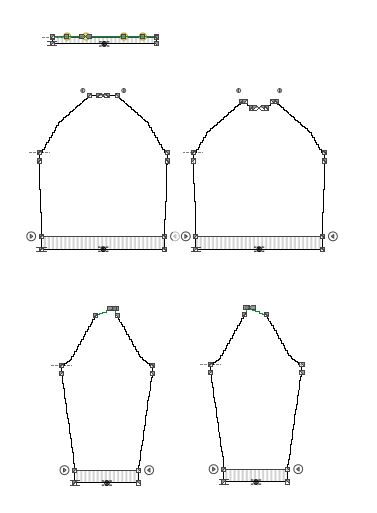
The determined stitch density of the stripes are entered in the step Prepare Stitch Densities and assign them in the step Prepare the Color Sequence to the stripe areas.