Create a Formula for the Cast-off Width at the Front and Rear neck
How to calculate the cast-off width at the back neck:
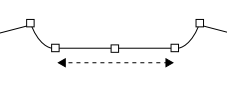
The cast-off width at the back neck is calculated relative to the neck width.[Cast-off width at back neck]/[Neck width] = k
In this case the desired relation is 3/4. Means k = 0.75.[Cast-off Width at Back Neck] = [Neck Width]*0.75
How to calculate the cast-off width at the front neck:
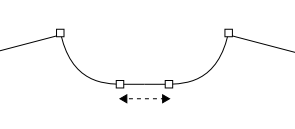
The cast-off width at the front neck is calculated analogously to the cast-off width
in the rear neck relative to the neck width. In this case k = 0.35.[Cast-off width at front neck] = [Neck width]*0.35
How to create the formula:
- The Dimensions
 tool window is open.
- Open the context menu of the Row No. column of the Formula table.

- Select Add Main Row.
- The pop-up window Formula Editor appears.
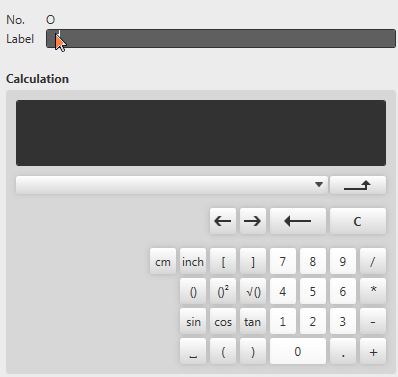
- Enter the text Cast-off Width at Back Neck as label.
- Select the Neck Width dimension in the list box.

- Click the * button.
- Click the 0, ., 7 and 5 buttons.
- The entry in the Calculation field is:
[Neck Width] *0.75 - Confirm with
 .
.
- The Formula Editor closes.
- A row with the Cast-off Width at Back Neck formula is added at the bottom of the Formula table.
 |
To create the formula for the cast-off width at front neck proceed the same way.
|