How to get the Brand Name to the Page Layout
The Stoll Page Layout is available for printouts of GKS shape files in the  A4Landscape format.
You can create your own Basic Page Layouts with the brand name of your company.
How to Create your own A4 Landscape Page Layout:
- Header for the Knit by CMS brand
- Open the Options dialog box of the Backstage View.
- Click the
 Basic Page Layout... button.
- The Basic Page Layout dialog box appears with the presettings of the Stoll Page Layout.
 Stoll Page Layout
 - Click the Insert Text context menu in the header of the preview.
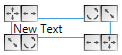
The text box appears at the cursor position.- Drag the text box larger with the
 grasper.
- Click in the text box and type the brand name.
For example Knit by CMS - Select the Knit by CMS text completely and format it by the mini toolbar as follows.

Bold and font size 16 pt. - Save the Basic Page Layout with the
 Save button and close the Options dialog box with OK.
- Printouts of all subsequently created shape files will have the Knit by CMS brand name in the header.

-
You can change the brand name for individual printouts in the Print Preview dialog box.
Print Preview (dialog box)