Additional settings tab
In the tab of the Configuration dialog box, you make the following settings:
|
Element |
Meaning |
|---|---|
|
section | |
|
|
Allow grouping of technical rows with different racking type to a stroke. |
|
|
Exclude grouping of technical rows with different racking type to a stroke. |
|
|
Use intermediate racking where it is possible. |
|
|
Reduce the running time of the fabric (e.g. Pointelle) on the machine if possible. |
|
section | |
|
|
Distributing of transfer rows or cast-off rows to several systems |
|
|
Distributing of transfer rows or cast-off rows to several systems |
 : If the distance between the both knitting areas is wider than nine inch, then the intermediate racking will be done consecutively by two knitting systems.
 .
.|
section | |
|
|
The right pattern area is initially knitted from right to left and then back again. Then the left pattern area is worked from left to right and then back again. With this method it must be ensured that with a narrowing present between the pattern areas, narrowing is always carried out after an even number of rows. In this case the yarn carriers are always outside the transfer area during narrowing. |
|
|
With this method, two neighboring intarsia areas are processed accordingly. At first the left pattern area is knit from right to left and then the right pattern area. Then the right pattern area is at first knit from left to right, and then the left pattern area. |
|
List field |
Enter the distance in rows up to which the yarn fields will be combined. |
|
|
With the checkbox activated, the command WS0 is entered in the knitting program. |

|
section | |
| All technical rows with Tuck needle actions will be knit by a knitting system for which Not sunken tuck is set. You activate the function for individual rows by the System Function control column. |
|
section | |
|
|
With the checkbox activated, different stitch lengths in a single technical row are worked with. If this checkbox is deactivated, the stitch length used most frequently is used for all other stitches during technical processing. |
|
|
If a NP value (
|
|
|
Enter NP value for shape edge. |
|
|
Enter NP value for outside needles. |
|
|
Specify the carriage speed with MSECNPJ. |
|
section | |
|
|
With an empty row the command W0 is entered in the knitting program (Sintral). This deactivates the fabric take-down. |
|
|
With an empty row the values from the Fabric take-down table from the Standard S0 entry, are applied in the knitting program. |
|
|
With an empty row the values from the Fabric take-down table from the Standard S0 entry of the following knitting row are applied to the knitting program. |

 ) of your own is present in a shape edge of a shape pattern, then this checkbox is activated so that the different stitch length will be applied at the shape border during a stitch length adjustment.

|
section | |
|
|
|
|
|
Allocation of the yarn carriers for optimized productivity |
|
|
Allocation of the yarn carriers for the secure yarn insertion at widenings of intarsia color fields. |
|
List field |
Adjust the safety distance, in order to achieve narrower yarn carrier distances specially in the case of coarser gauges. |
|
Section | |
| New plating colors automatically receive the ikat type ID when being created.
|
| New plating colors are created without the ikat type identifier. |
section | |
| Rows with will be separated for several systems with a lower quantity of needles.
|

 : Has also effect in rows with CA!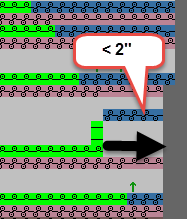

 : The value may not fall below default
|
section | |
|
|
|
|
The technical processing determines optimized stopping positions at the fabric selvedge. Briefly not used yarn carriers are positioned as close as possible to the fabric selvedge. | |
|
List field |
Adjust the distance between parked yarn carriers and the fabric selvedge. |
|
List field |
Adjust the distance between the stopped yarn carriers. |
|
Section | |
| |
| Tie in vertical floats at the fabric selvedge. Prevent certain rows from border fixation in the Border Fixation control column. Border Fixation Control the border fixation of the whole pattern or individual yarn fields in the Yarn Field Allocation dialog box Border Fixation |
| Select the module for the left fabric selvedge. |
| Select the module for the right fabric selvedge. |
| Determine the number of rows after which the float is to be fixed. |


section Effective only for enclosing weft yarn by transfer! | |
| The weft yarn will in any case be enclosed at the border of the color field. A distance without enclosure may remain without this option. |
| |

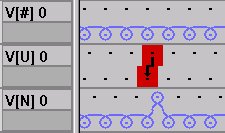
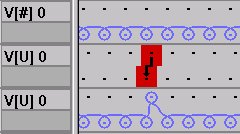
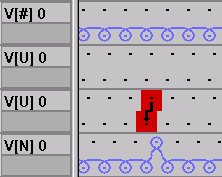
Example for racking per stroke:
|
Different racking types before technical processing | Result following technical processing with Equalize stroke racking type (UN, U#, N#, U#N) option button selected | Result following technical processing with selected option field Don't equalize stroke racking type |
|---|---|---|
|
|
|
| The first two rows are grouped to form a stroke. | No rows are grouped to form a stroke. After the transfer row an empty row is required, as the yarn carrier is located on the other side. |
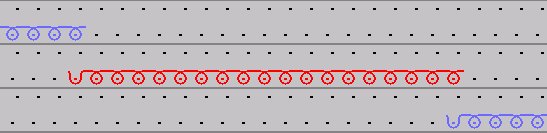

- If in the Yarn Field Allocation dialog in the
 column, the option
  is allocated, then the yarn carriers will not be grouped, as the tie-off would fall out of the needle hook when knitting.
 -
 is deactivated in those areas, in which a knitting sequence is defined in the Technical Row Data dialog box and/or in which the
  setting is activated in the
  control column.
 -
may be without effect if the
 option is active:
 - Yarn carriers of a higher track number will not be moved before neighboring yarn carriers of a lower rail number with the option active.
- This rule may have different results depending on the carriage direction, as the knitting sequence may be reversed due to carriage direction.
- The effect even with yarn fields without color widening.