devoré knit (devoré-technique)
Knitting sequence devoré knit:
Two systems are necessary to produce devoré patterns
In the 1st system all the needles are driven out in knitting position and the binding thread will only be laid-in, not sunk. The needles remain in tuck position and will thus move into the following 2nd system.
In the 2nd system the selected needles are driven out in tuck position, the motif yarn is laid-in,and all the binding threads and motif yarns are sunk together.
Requirements for the machine
- Number of systems of the machine: 2 systems for the filigree technique and 1 system for transferring
- devoré knit cams. These will be assembled into the 2 rear, right knitting systems.
These systems will be assigned to the system functions of devoré technique. The system functions of the front knitting systems will not be changed.
Pattern generation devoré knit
- M1plus Version V5.7 or higher.
- 1
- Open a new pattern.
- 2
- Select a machine with a minimum of 3 systems.
- 3
- Open the tab of the MC-Attribute dialog box.
- 4
- In the Knitting system section select the check box.

- 2 right knitting systems selected.

- In the section the system functions are adjusted.
- 5
- Confirm with OK.
- 6
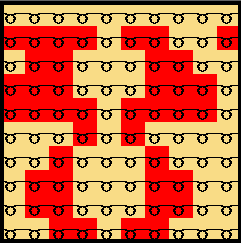
- Draw the 2 color Jacquard with the Front stitch with transfer or Rear stitch with transfer modules.
- 7
- Select the area for devoré technique.
- 8
- Run the function in the menu.
- The Jacquards dialog box appears.
- 9
- Yarn colors are applied to the section.

The left color is the binding thread, the right color the motif yarn. - 10
- In the section select the option field.
- 11
- In the section select the Jacquard type under Jacquard / Stoll / devoré knit/Plush
- 12
- Confirm with OK.
- Modules were replaced by devoré knit Jacquard modules.
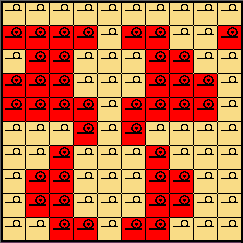
The devoré knit Jacquard module causes the pattern to be processed on the rear needle bed now.
The reason is that all front knitting systems can execute all standard functions. These are especially needed during the comb starts (clamping and cutting).
Starts with elastic thread.
When using starts with elastic thread, please note that the elastic thread is processed without any specific setting on the rear needle bed. However, as the pattern is knitted on the rear needle bed, the elastic thread lies on the visible front fabric side.
To process the elastic thread on the front needle bed, use starts, which have a setting option of the cycle counter 19 with the value 2 (RS19=2). The setting can be made either on the M1plus or on the machine.
- 13
- Make yarn carrier settings in the Yarn Field Allocation dialog box.
- 14
- Execute the function. When using Color Arrangements execute previously the function.
- In the
 control column the binding thread
  and the motif yarn
  will be entered system related.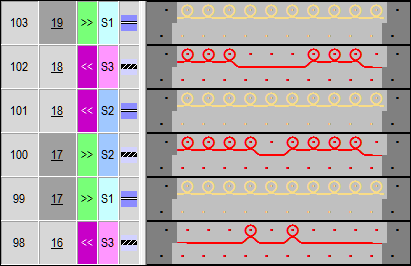
The control column contains the following functions: 

Sintral:
The devoré technique can be combined with the plush technique.