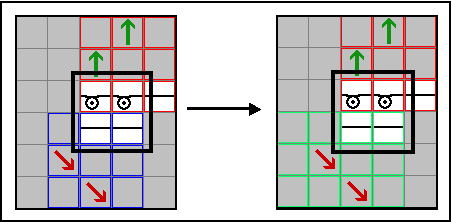
Design
Structure using as example Binding-off RL with fixing 01_CA
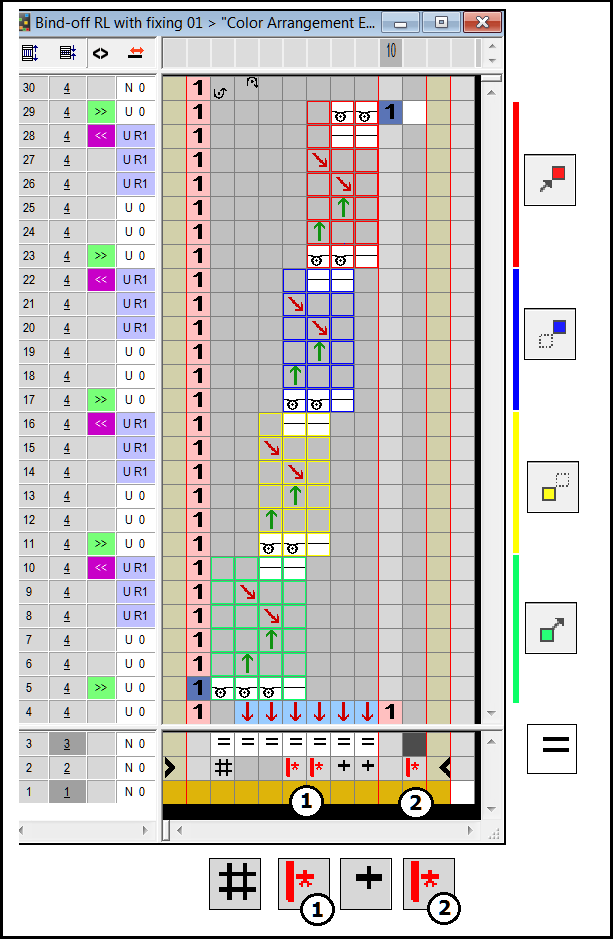
Color Arrangements with repetition areas need additional specifications:
-
Repetition areas: With the symbols
 ,
,  ,
,  and
and  of the Color Arrangement toolbar you define four areas within the search areas of a color or shape attribute
  .
.
Here you will find information about this: Allocate repetition area - Repetitions:
- With the symbols
 and
and  (1) within the search areas of a color or shape attribute you define the repetitions outside the repetition areas, in the example the technical rows 4 and 30.
The color arrangements with repetition areas require a minimum insertion width in most of the cases.
Here applies:
Minimum insertion width = width of first search area – number outside shape
  – Excess width
  – number of repetitions or
In this example: 7 – 1 – 2 – 2 = 2 - With the symbols and (2) in the search area without repetition area the repetition is entered depending on the pattern.
In case of minimum insertion width the repetition areas and are not inserted. For the insertion of the repetition areas and the positioning of the repetition areas and towards each other is decisive.