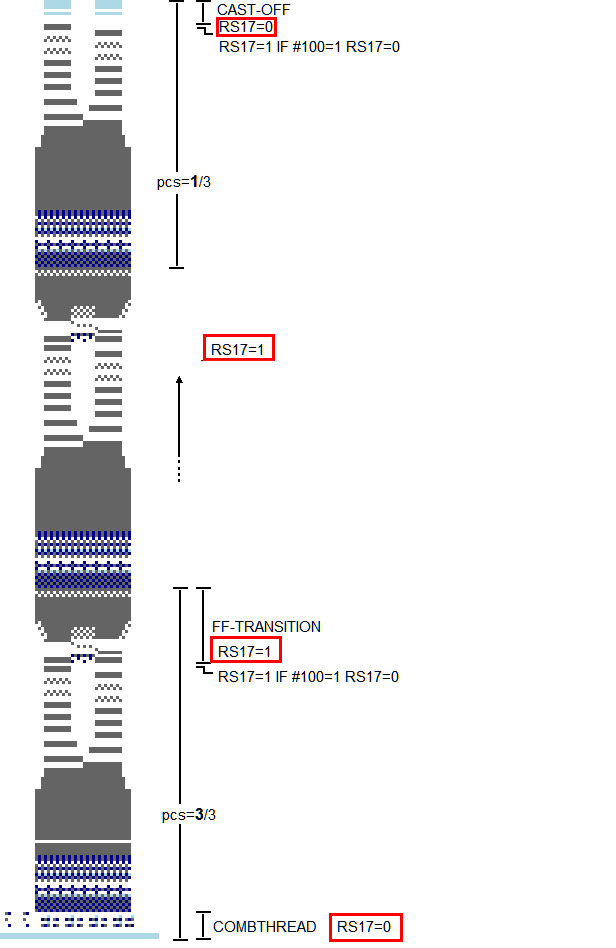
RS17=0 + RS17=1 - Optimized handling
- The handling of the switchable cycle RS17 was optimized.
- The new options are available for the Fully Fashion- and Knit and Wear patterns.
Comb on / off (RS17)
In the New pattern dialog box you activate the switchable cycle RS17 with the option. This way the transition is entered in the pattern.
New Pattern dialog box/Start section
If the check box is active, then in case of a new pattern the check box is automatically set in the Configuration / Comb, clamping dialog box.
Sintral command RS17=1 IF #100=1 RS17=0
In the Configuration / Comb, Clamping dialog box you activate the Sintral command RS17=1 IF #100=1 RS17=0 with the check box.
Configuration /Comb, Clamping tab
- RS17=1: After the protection rows the FF-TRANS function is called-up and this way the transition with widening and casting-off is processed.
- RS17=0: After the protection rows the fabric is cast-off.
- #100: Piece counter at the machine.
Application example