Generate a double jersey racking pattern with shape
In order to place a shape on a double jersey pattern with racking the Jacquard must be generated in the way that the selection of the rear needle bed is opposite to the front needle bed without racking. For this you can set the VJA^0 Sintral command via the control column.
If you set this sintral command to a row the data of the rear needle bed will be displayed without racking. By this you can place a shape without taking the racking into account.
You can generate double jersey racking pattern with knitting the basic pattern on the front needle bed only. The pattern selection must be placed on the rear needle bed.
Generate a double jersey racking pattern with shape:
You can find the corresponding pattern example in the Ready-to-use Pattern Collection:
pattern M53_F_08.mdv (fully fashion double jersey with racking)
- The ground fabric is knitted on the front needle bed.
- Pattern selection for the racking pattern occurs on the rear needle bed.
- 1
- Call up the function with a click of the right mouse button on an icon of the control column in order to display the control column in the Technical View.
- The Select columns dialog box appears, in which you can select the control column.
- 2
- Select the VJA^0 function via the context menu of the control column.
- VJA will be displayed at the cursor.
- 3
- Allocate the VJA^0 sintral command to all rows of the pattern from the last row of the start to last row.
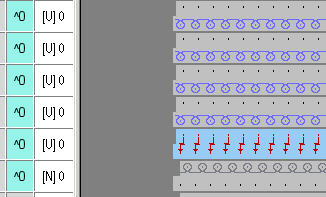
The VJA^0 sintral command is also allocated to the last row of the start in order to collect the rib correctly even if the racking of the last row of the start is different to the first pattern row.
- 4
- Generate a complete pattern cycle and transition between start and pattern.
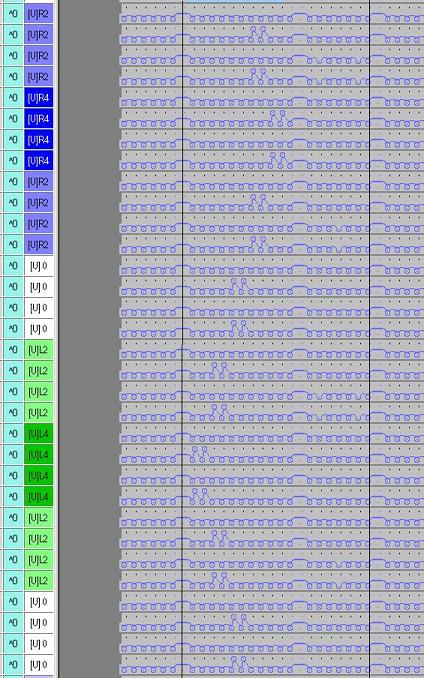
With the VJA^0 sintral command allocated the needle occupancy of the rear needle bed will not be displayed correctly in any case.
- 5
- Generate a module of the cycle.
The [V] 0 racking must be kept in the module.
By this you can place the module several times next to each other without adding up the main racking.
- 6
- Copy the main racking of the cycle of the pattern and paste it into all knitting rows with the function.
- By insertion of the module on the right and on the top, the complete basic pattern is prepared.
- 7
- Copy the transition from the waistband to the pattern and paste it to the right.
- 8
- Save the original pattern before laying on the shape so that other sizes may be generated.
- 9
- Create the shape:
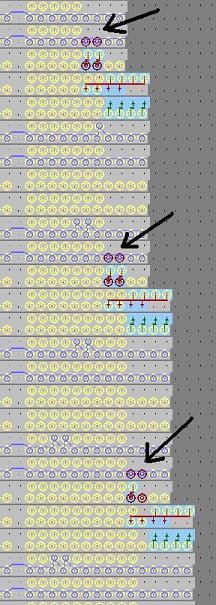
When generating the shape watch out that the needle occupancy will not be displayed correctly in any case with the VJA^0 sintral command allocated. In this case needles may be transferred to the front which are displayed as occupied by mistake.
This is why no stitches with transfer, but rather only stitches, should be used when fading-out the shape edges.
- 10
- Set the racking [V] 0 for the last knitting row in patterns with a cut-out shape.
Background:
With Technical Processing, a protective row is automatically entered with the racking of the last pattern row. This can bring up an error message saying the yarn carrier can not be clamped with the rear needle bed racked.
Double jersey stitches, which extend into the shape edges, must be manually reworked, since the needle occupancy is not correctly determined in all cases.