ShapeSizer: Saving the size table
- The Save as... dialog box is open.
- 1
- Specify the path for the desired file.
- The size table is saved as *.shz file and the elements of the selected size will be saved under the same path.
When saving, ensure proper directory path.
Recommendation: Save all shape elements to one directory.
Name example of a file:
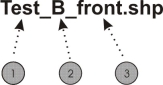
|
No. |
Meaning | |
|---|---|---|
|
1 |
Name of shape | |
|
2 |
B |
Basic shape (corresponds to basic size <*6>) |
|
01 |
Size 1 | |
|
02 |
Size 2 | |
|
3 |
Type of shape element | |
|
front |
Front piece | |
|
rear |
Back piece | |
|
sleeve |
Sleeve | |
- 2
- Change to the next dialog window with the Continue> button.