Working with modules: The step module
Characteristics of a step module:
- Marking

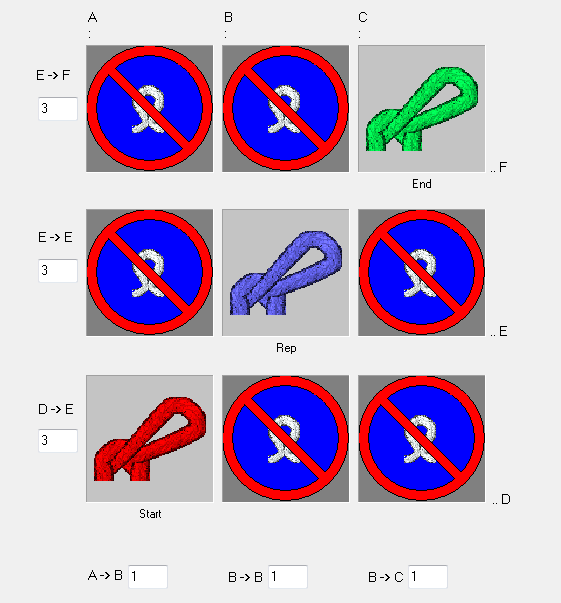
- combines a maximum of 3 different diagonally arranged modules
- Horizontal repetition of the modules
- Used for example as binding-off module
Generating a step module:
- Allocating the modules into the step modul by Drag & Drop.
- Diagonally from left to right = Binding-off from left to right
- Diagonally from right to left = Binding-off from right to left
- The offset values will be applied automatically by the allocation.
- You can position horizontally and / or vertically by changing the offset.
- The offset values are always referred to a reference point in the lower left of the module.
- In the modules all the technical rows must be grouped to a pattern row.
Behavior of a step module:
- 1
- Draw in the module in horizontally on an existing pattern row.
- 2
- Expand the pattern with the
 button of the Steps of Processing toolbar.
- The technical rows of the step module will inserted into the pattern.
Example for demonstration: Step Module with a stitch line for Petinet
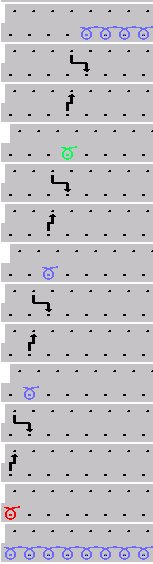
The direction specified in the module (position of the elements within the step module) will be observed by the processing.
Meaning of the offset:
|
Offset values with a step module | |||
|---|---|---|---|
|
|
Vertical distance from the first technical row of the most upper repetition module to the first technical row of the end module. | ||
|
|
Vertical distance of the first technical row of the repeat modules between each other | ||
|
|
Vertical distance from the first technical row of the starting module to the first technical row of the first repetition module. | ||
|
|
|
|
|
|
Horizontal distance of the module to the module on the right-hand side |
Horizontal distance to the next positioning of the same module |
Horizontal distance of the module to the module on the left side | |


If the offset value is smaller than the module width the modules are inserted overlapping.
You will find an example of a step module for binding-off under Further Topics in the chapter Step module for shirt pocket.