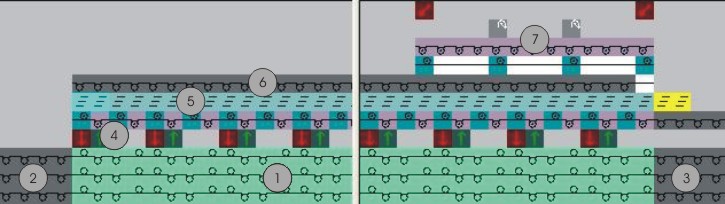
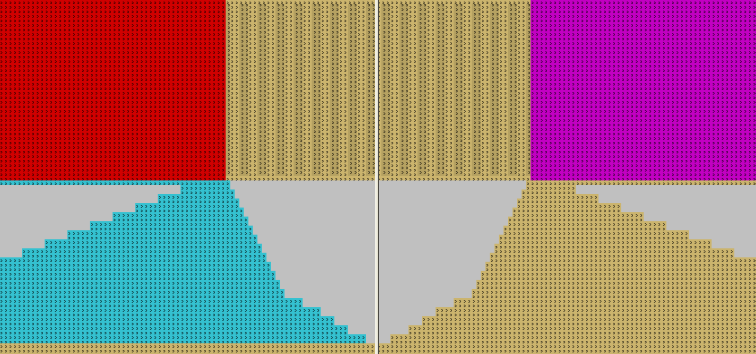
Correct a Pattern with cut-out Shape
- 1
- Cut out the shape with
 of the Steps of Processing toolbar.
 - 2
- Correct the protection rows at the left and right of the collar and overwrite them with Front Stitch with Transfer.
- 3
- Insert several rows with Within Shape following the collar end.
- 4
- Draw in knitting sequences in to the inserted rows manually.
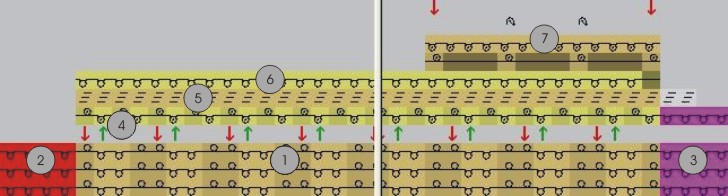
|
No. |
Knitting sequence |
|---|---|
|
1 |
Collar |
|
2 |
Protection rows at the left |
|
3 |
Protection rows at the right |
|
4 |
Knit-in draw thread |
|
5 |
Binding-off |
|
6 |
Knit out draw thread |
|
7 |
Thread securing at the end of the collar |
- 5
- Delete the last row of the protection row at the left (2).
- 6
- Draw-in the knitting-in of the draw thread (4) by Front Stitch / Rear Stitch and with yarn color # 207 into the last row of the collar.
Note: Insert the draw thread in empty needles. - 7
- Draw-in binding-off (5) for the collar.
Use the module Stoll / Binding-off / without Draw thread / 1x1 / BO-1x1-01> of the Module Explorer of Database. - 8
- Draw-in the knitting-out of the draw thread (6) by Front Stitch with Transfer.
- 9
- Draw-in a thread securing at the end of collar (7).
Switch to  for editing.