Generate Color Arrangement for Intarsia binding
I. Generate Color Arrangement for Intarsia binding with float:
- The Intarsia pattern is drawn with different yarn or yarn carrier colors.
- 1
- Select the first two motif rows via the row selection bar.
- 2
- Click the
 icon in the toolbar.
 - 3
- Confirm and close the Properties of: CA#1 dialog box with OK button.
- The color sequence present in the selection will be displayed in the Color Arrangement Editor.
- 4
- Edit Color Arrangement:
- Create column selections.
- Specify number of columns to be inserted.
- Column type: select or .
- 5
- Draw in the Float with transfer to the rear needle action in the inserted columns.
In the columns with the + symbol you always have to enter color and needle actions or no entry.
- 6
- Insert the
 icon below the search color in the columns for the Intarsia Binding .
- The columns marked with the icon will be inserted in the defined width at the color field border once.
Example: Binding intarsia by means of symbol +
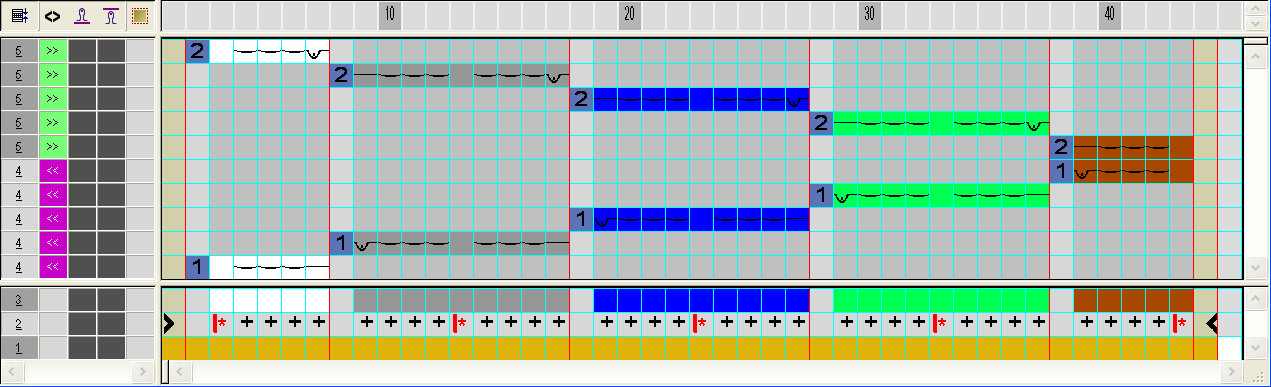
- 7
- Close the Color Arrangement Editor with
 .
. - 8
- Expand the selected rows to check the binding.
- The preview window will be opened.

- 9
- Close the preview with .
- 10
- Draw-in the CA in the
 control column over the entire height of the pattern.