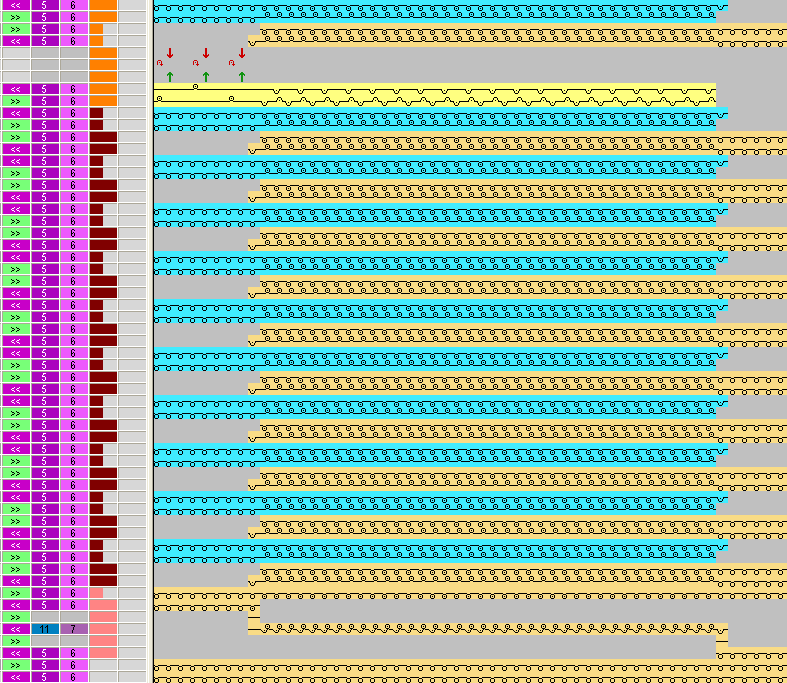
Pattern and Color Arrangement for shirt pocket with two yarn carriers
I. Create and draw a new pattern:
- 1
- Create a new pattern with setting.
- 2
- Draw a basic pattern with three different yarn colors.
- The yarn colors are not yet allocated to any yarn carrier rail.
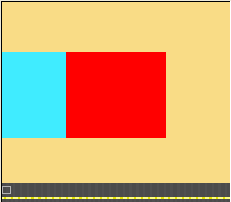
Create all pattern areas even-numbered in height.
The pattern can also be drawn with yarn carrier colors.
The yarn carriers will be positioned on the bars due to the selected yarn carrier colors then.
II. Generate Color Arrangement for pocket start:
- 1
- Select the first two pattern rows in the pocket area via the row selection bar.
- 2
- Click the
 icon in the Default toolbar.
Original Color Arrangement:
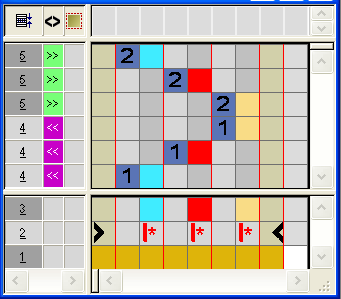
- 3
- Modify CA: Start of Pocket
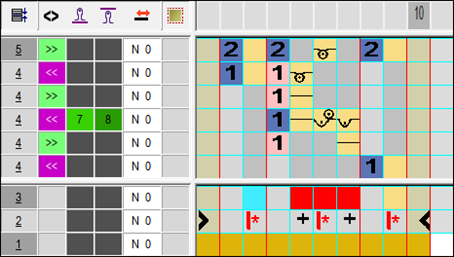
- In the processing area of the red search color:
- Insert rows:
Draw-in knitting sequence for pocket start and additional rows with reference row number. - Insert columns:
Draw-in moving of the yarn carrier and mark the columns with .
. - Enter carriage direction and stitch tensions.
- 4
- Close the Color Arrangement Editor with
 .
.
- CA will be saved under local Color Arrangements.
- 5
- Enter CA in the control column of the first two pattern rows of the pocket area.
- Expanded pattern for pocket start:

III. Generate Color Arrangement for pocket:
- 1
- Select the pattern rows in the pocket area via the row selection bar.
- 2
- Click the icon in the Default toolbar.
- The original Color Arrangement (see above) is displayed.
- 3
- Modify CA: Pocket
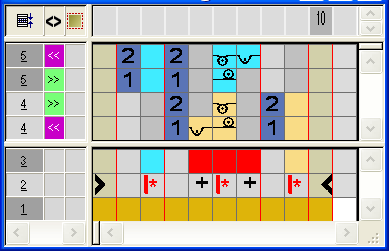
- In the processing area of the red search color
- Insert rows: Draw-in knitting sequence for pocket and reference row number.
- Insert columns: Draw-in the binding at the pocket border and mark the columns with .
- Enter carriage direction and stitch tensions.
- 4
- Close the Color Arrangement Editor with .
- 5
- Enter CA in the control column of the pattern rows of the pocket area.
- Expanded pattern for the pocket:

IV.IV. Generate Color Arrangement for pocket end with draw thread:
- 1
- Select the last two pattern rows in the pocket area via the row selection bar.
- 2
- Click the icon in the Default toolbar.
- The original Color Arrangement (see above) is displayed.
- 3
- Modify CA: Pocket end
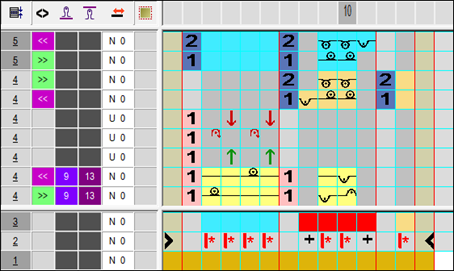
- Insert rows / columns and draw-in the knitting-in and out with casting-off the draw thread with the technique color #207 and mark them as additional rows.
- In the processing area of the red search color:
- Insert rows.
Draw-in knitting sequence for pocket and reference row number. - Insert columns.
Draw-in the binding at the pocket border and mark the columns with. - Enter carriage direction and stitch tensions.
- 4
- Close the Color Arrangement Editor with .
- 5
- Enter CA in the control column of the last two pattern rows of the pocket area.
- Expanded pattern for pocket start:

V. Expanded pattern of the shirt pocket: