Create the shape in the M1plus Shape Editor
Create shape:
- 1
- Call up the M1plus Shape Editor dialog box via the / menu.
- The dialog box will be opened.
- 2
- Open an existing shape via the /
 menu and convert it to the shp format.
- or -
Generate a new shape of the shp format in the Shape Editor via .
. - 3
- Deactivate the
 checkbox.
 - 4
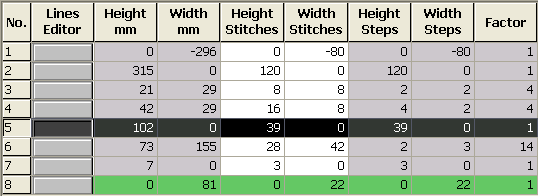
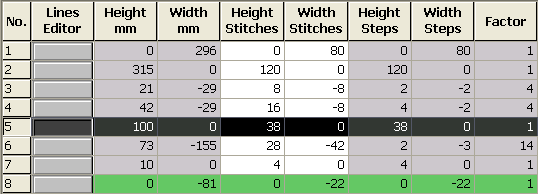
- Create a element for a left and right front:
Basic element left front (left lines):
Basic element right front (right lines):
To be observed when generating the shape:
- The narrowings should be offset left and right in the height.
- Narrowing on the right on even row number.
- Narrowing on the left on even row number.
- The total height of the shape must have an even number of rows.
- The narrowings left / right depend on the direction.
- Shape and narrowing modules must be matched to each other.
If a racking step exists in the used narrowing module, the shape must get the corresponding stepping.
- 5
- Allocate the generated narrowing module to lines no.6 of the left and right shape part.
- 6
- Save the shape via the / or menu.
- The shape will be saved in the shp format.
- 7
- Exit the Shape Editor by
 .
.