Draw basic pattern and define plating colors
I. Draw motif and define plating colors
- 1
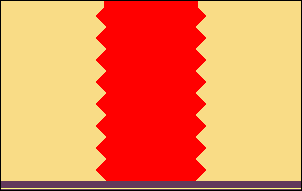
- In the basic pattern draw-in the desired motif with another yarn color.
- 2
- Open the Plating dialog box with
 .
. - 3
- In the dialog box enter the used motif colors in the first two of the four columns.
- The first plating color, which is displayed in the first column of the window, is generated. It can be changed.
- 4
- For changing the plating color, position the cursor in the column on the plating color to be modified.
- 5
- Call up the menu with the right mouse button and select .
- 6
- In the Color dialog box select the desired color and confirm the entry with OK.
- The color is applied.
Inverse plating (with system change)
For the so called Inverse Plating (with system change) one needs a different plating color for each color change.
- 7
- Position the cursor in the area of the four columns of the dialog box and call up the menu with the right mouse button.
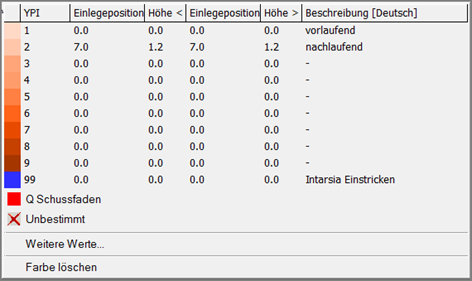
- The Plating table with the Plating Offset values (YPI) and the default values will be displayed.
|
Column |
Specifications |
|---|---|
|
YPI |
Table of the YPI indexes
|
|
Insert Position << |
Horizontal Offset of the driving unit of a yarn carrier for the carriage direction to the left
|
|
Height << |
Vertical Offset of the yarn carrier for the carriage direction to the left
|
|
Insert Position >> |
Horizontal Offset of the driving unit of a yarn carrier for the carriage direction to the right
|
|
Height >> |
Vertical Offset of the yarn carrier for the carriage direction to the right
|
|
Description |
Description of the yarn carriers, which are used when plating. Example: |
 : Index
This table can also be opened via the / menu.
The default values of the table are in the globalparameters_681 file.
- 8
- Select the desired YPI index (1) from the table.
- 9
- Position the cursor on the corresponding motif color and click on it with the left mouse button.
- The index (1) will be allocated to the motif color (leading yarn carrier).
Default: 0.0.
- 10
- Allocate the YPI index (2) to the second motif color (= following yarn carrier).
- 11
- Enter the settings for the selected YPI index in the table.
- 12
- Change the order of the yarn colors for the second plating color.
- 13
- The allocation of the YPI index keeps untouched.
The exchange of yarn colors in the Plating dialog box determines the change (inverse plating) of the yarn carriers.
Result:
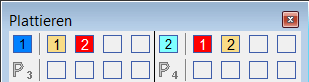
The generated plating colors are required in the pattern and if necessary in the start (P1).
II. Import of templates (images) for patterns with inverse plating:
- The image must be reduced to 2 colors in a image processing application.

- 1
- Open M1plus and create a new pattern with
 .
. - 2
- Import the image using the image import under .
- 3
- Draw-in the pattern element into the basic pattern.
- The pattern element with 2 colors is placed in the basic pattern.
- 4
- Modify the image manually.
When inverse plating at least 2 pixel per color are to knit neighboring. This way a 'clean' inversing of the yarn carriers is ensured.
- 5
- Define one plating color for each pattern color using the dialog box.
- 6
- Change the pattern colors into plating colors.