CA #2: Weft yarn and basic yarn are of different thickness
Yarn thickness of the weft yarn
In general, the weft yarn is much thicker than the basic yarn.
I. Generating Color Arrangement #2 and entering it:
- 1
- Select the 'circle' motif in the entire height.
- 2
- Click the
 button.
- The Color Arrangement Editor will be opened.
- 3
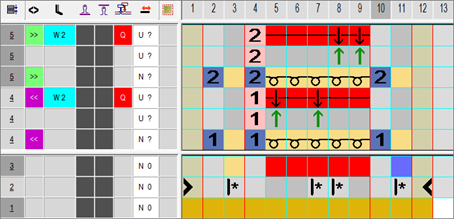
- Modify the Color Arrangement:
Control Column: | |
Selection Menu: | |
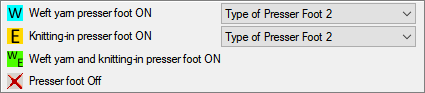
| Switch-on weft yarn presser foot
|
Selection menu for the presser foot type mounted to the machine
| |
| Switch-on knitting presser foot
|
Selection menu for the presser foot type mounted to the machine | |
| Swith-on weft yarn presser foot and knitting-in presser foot
|

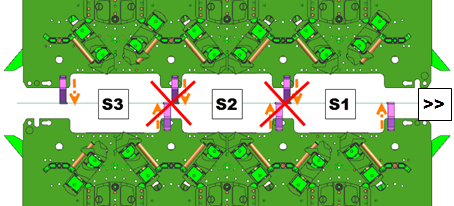
 : The weft yarn presser foot is active ahead of the knitting system

 within the control column
Attention!
Presser feet at front and rear must not be activated at the same time, otherwise they will collide.
These unallowed combinations will be detected by the technical processing and the processing will be canceled.
- Insert additional columns in the color segment with the #7 search color (red) for border processing the motif (without a function in the search area).
- Change the following in the processing area:
- Change the knitting sequence (the #31 yarn color knits continuously).
- Change the search color #23 into the yarn color #31.
- Insert additional rows for transferring and draw-in transfer symbols.
- In the additional rows with yarn color #7, draw-in the Weft yarn / Transferring to the front with float needle action according to the desired structure.
- Insert structure / needle actions with yarn color #7 in the columns for border binding.
- In the
 column for the weft yarn carrier insert
  .
. - Select in the context menu of the
 column and activate the weft yarn presser foot.
Enter the symbol for in the control column.
- 4
- Close the Color Arrangement Editor with
 .
.
- The CA is saved and the color entry is entered in the
 control column.