Draw basic pattern and define plating colors
I. Draw motif and define plating colors
- 1
- In the basic pattern (yarn color #31) draw-in the desired motif with another yarn color #4.

- 2
- Open the Plating dialog box with
 and create following plating colors:
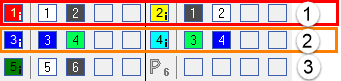
- 4 plating colors for pattern
- 1 plating color for the start
No. | Plating Colors | Use |
|---|---|---|
1 | P1 (red) | Plating color combination for the first pattern row, which is worked in the first system. |
P2 (yellow) | ||
2 | P3 (blue) | Plating color combination for the second pattern row, which is worked in the second system. |
P4 (light blue) | ||
3 | P5 (dark green) | Plating color for the start |
| When creating the plating colors for Stoll-ikat plating ® you have to allocate type (i) to the plating color. | |
 :
:
Stoll-ikat plating ®
For the so-called Stoll-ikat plating® one needs two plating colors (= a plating color combination) per pattern row for each color change in one system.
With Stoll-ikat plating® it is possible to use a different plating color combination in each system.
A maximum of 30 changes of position are allowed in one pattern row, where a distance of 2 inches (with 1.0 m/s) between the color changes is to be respected.
- 3
- Right click on the corresponding plating color.
- 4
- Select the item of the context menu.
- The plating color is indicated by the i symbol.
- 5
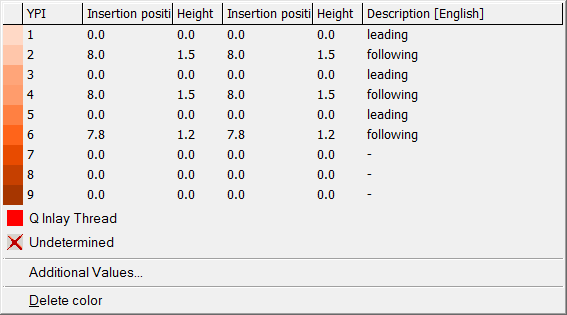
- Right click the corresponding yarn color of a plating color combination.
- 6
- Select the desired YPI index from the table and allocate it.
Result:
No. | YPI Index |
|
|---|---|---|
1 | YPI 1 + YPI 2 |
|
2 | YPI 3 + YPI 4 | |
3 | YPI 5 + YPI 6 |