Create the shape in the M1plus Shape Editor
I. Generate a shape:
- 1
- Via the / menu open the M1plus Shape Editor dialog box.
- The dialog box will be opened.
- 2
- Open an existing shape via the / menu or with the
 button and convert it to shp format.
- or -
Create a new shape in the shp format via / or with the button.
 - 3
- Create a element for a front:
- The checkbox is deactivated.
Basic element front left lines:

Basic element front right lines:
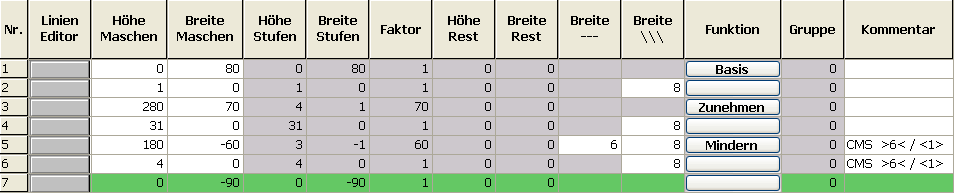
The right shape edge with widening attribute must be shifted in height by 1 row based on the knitting sequence.
- 4
- Save the shape via the / or menu.
- The shape will be saved in the shp format.
- 5
- Close the M1plus Shape Editor with
 .
.