Define Plating Colors and Draw Basic Pattern
I. Define a plating color and draw it into the basic pattern:
- 1
- Open the Plating dialog box with
 .
. 
- 2
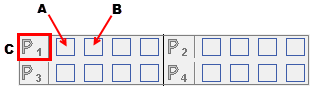
- Make the following settings for the first plating color (P1) in the dialog box:
- at the first positionA
Allocate yarn color #1 (e.g.) and the Q symbol for insert of the weft yarn via the context menu - at the second positionB
Yarn color #2 e.g. - at the third position etc.
Yarn color #3 e.g.
Result: 
- 3
- Position the cursor in the line of (P1) of the dialog box and call up the menu with the right mouse button.
- The Plating table with the Plating Offset values (YPI) and the default values will be displayed.
- 4
- Select the desired YPI index from the table.
Yarn color + Q: No YPI necessary as the default for Q (35 nic) is used.
YPI index (1): Leading yarn carrier
YPI index (2): Following yarn carrier - 5
- Position the cursor on the corresponding motif color and click on it with the left mouse button.
- The index will be allocated to the first motif color #2 (leading yarn carrier).
- 6
- Allocate a YPI index to the second motif color at (P1) as well.
- 7
- Enter the settings for the selected YDI index in the table.
- 8
- Fill the basic pattern with yarn color #31 by the plating color (P1).

Plated start
If you want to plate the start as well, you have to define a further plating color in the Plating dialog box and to draw it in the start.