Create shape: short body with inserted and linked sleeve
I. Generate a front in the Shape Editor:
- 1
- Open the Shape editor via /.
- 2
- Select a k&w ... entry under .
- 3
- Set to Stitches.
- 4
- Activate
 under .
 - 5
- Specify starting width.
- 6
- Create the table under Left Lines and enter the values for the front.
Front / back with gored shoulder
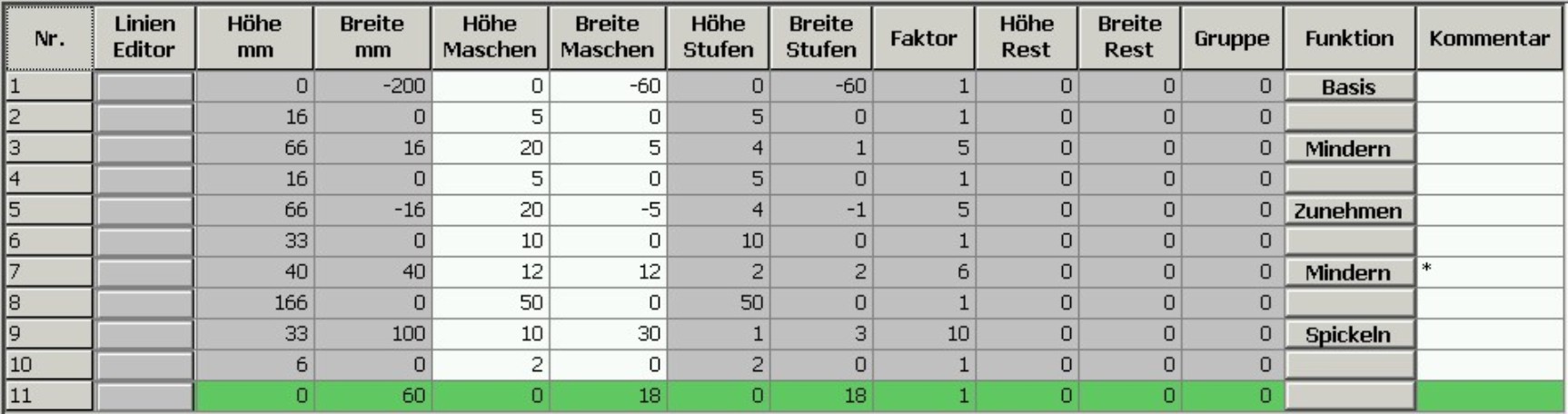
- 7
- Allocate the desired attributes to the shape edges under in the and tabs.
The shape with linked sleeve will not be narrowed in the body but in the sleeve.
- 8
- Allocate the following attributes to the shape edge (no.7).
|
Adjustments | |||
|---|---|---|---|
|
Line 7 |
|
Activate | |
|
|
Fade-out width |
0 | |
|
Narrowing width |
0 | ||
|
Type of narrowing |
| ||
|
Activate | |||
II. Insert the round neck element in the front:
- 1
- Open the shape editor via / .
- 2
- Call-up the shape short body front via / .
- 3
- Generate a new element in the Shape Editor with the
 key.
key. - 4
- Select the entry Neck opening in the selection list.
- 5
- Generate the values for a V-neck under Left lines.
Element Neck opening: Round neck

|
Adjustments | |||
|---|---|---|---|
|
Line 1 |
General information |
Binding-off | |
|
Binding-off |
Binding-off type |
V-neck start L0lL1 | |
|
Line 2 |
Narrowing |
Fade-out width |
As desired |
|
Narrowing width |
As desired | ||
|
Type of narrowing |
V-neck underneath/above | ||
- 6
- Specify the value 0 for Distance to end line.
- The element Neck opening (round neck) will be positioned in the front without distance to end line.
- 7
- Save shape.
III. Generate a back in the Shape editor:
Create the shape for the back in the same way as with the front.
- 1
- Open the tab in the end line (edge no.11) under and enter .
- 2
- Select Neck with draw thread in the selection list in the tab under Module.
- 3
- Save shape.
IV. Generate a sleeve in the Shape editor:
- The Shape editor dialog box is opened.
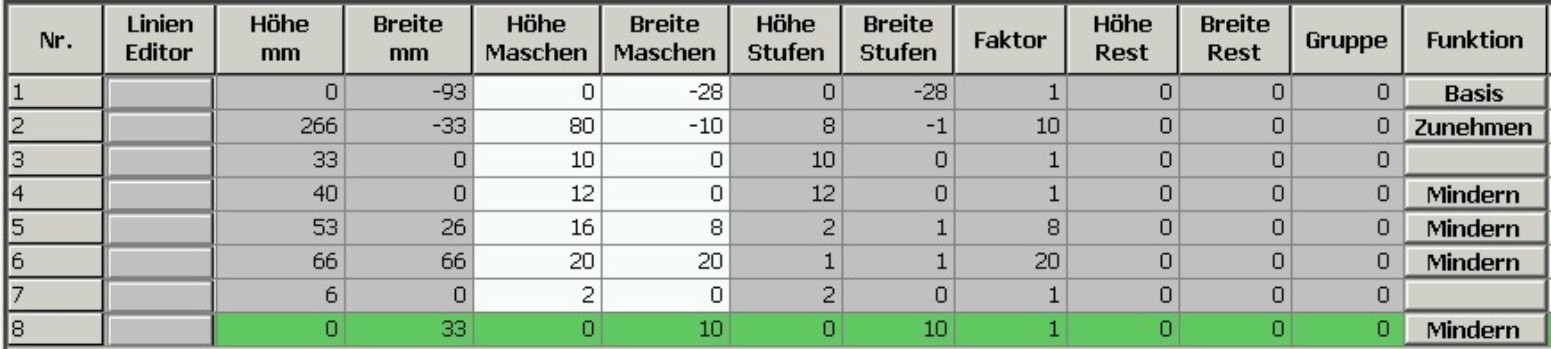
- 1
- Create the table under Left Lines and enter the values for the sleeve.
Sleeve element
|
Adjustments | ||
|---|---|---|
|
Line 4 |
General information |
Define Narrowing |
|
Narrowing |
Activate | |
|
End line |
General information |
Define Narrowing |
|
Narrowing |
Select the Remaining narrowing module | |
|
connections |
| |