Load and position the shape elements
Open shape elements and position them on the basic pattern:
- 1
- Call up the dialog box Open k&w shapes via the / menu.
- 2
- Load the shape elements for body, sleeve and collar in the dialog box using the
 key.
key. - 3
- Specify the knitting mode of the collar via the selection menu:
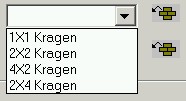
You can select different knitting modes for the front and back collar elements.
- 4
- Press the OK key.
- The individual shape elements will be laid onto the basic pattern.
- 5
- Position the shape elements Sleeve and / or Body with collar on the motif with the
 symbol selected and the left mouse button pressed.
- or -
Select the desired shape element with the symbol selected. Position the selected shape element with the arrow keys of the keyboard.
- or -
using the Tool properties dialog box