Calculate Color Arrangements
Calculate Color Arrangements based on the modified k&w Arrangements:
- 1
- Open the Shape View with
 .
.
- or -
Switch the Symbol View with into the Display Pattern Cut-out k&w presentation.
 - 2
- Toggle on control columns:
- k&w Arrangement with

- Color Arrangements with

- 3
- Select the rows from the start upto the end of the front (without collar) in the row selection bar
 .
. - 4
- Place the cursor in the control column and call up the context menu.
- 5
- Select .
- Color Arrangements will be generated based on the k&w Arrangements in use. They are represented color coded in the control column.
Result:
- The CA calculated based on the k&w Arrangements are displayed in the Modules toolbar on the tab
 .
. - The k&w Arrangements in use are displayed in the Modules toolbar on the tab
 .
. - CA are coupled to the original k&w Arrangement and named in the k&w Arrangement Editor.
- 6
- Delete the selection with
 .
. - 7
- Adjust the CA according to the desired Intarsia knitting cycle.
Example: CA_A1-3 tubulars
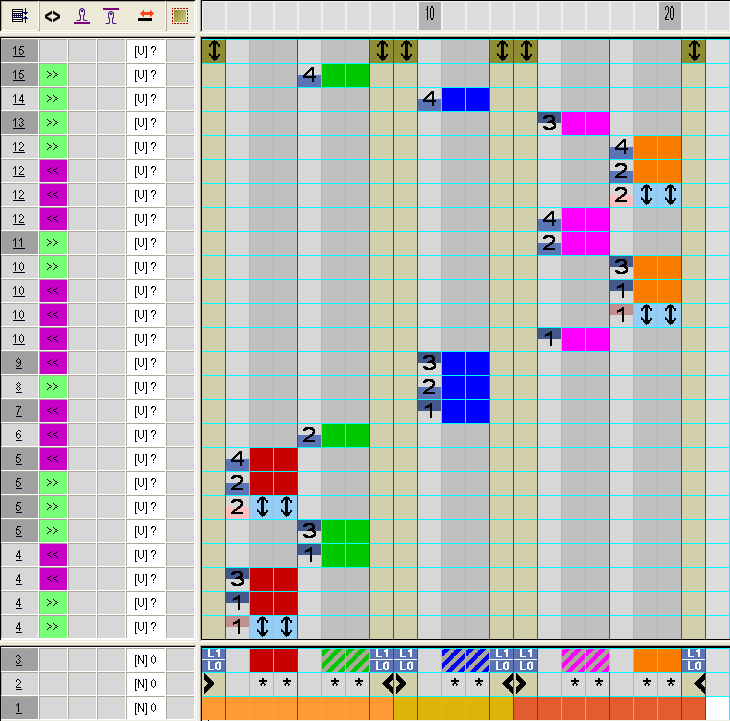
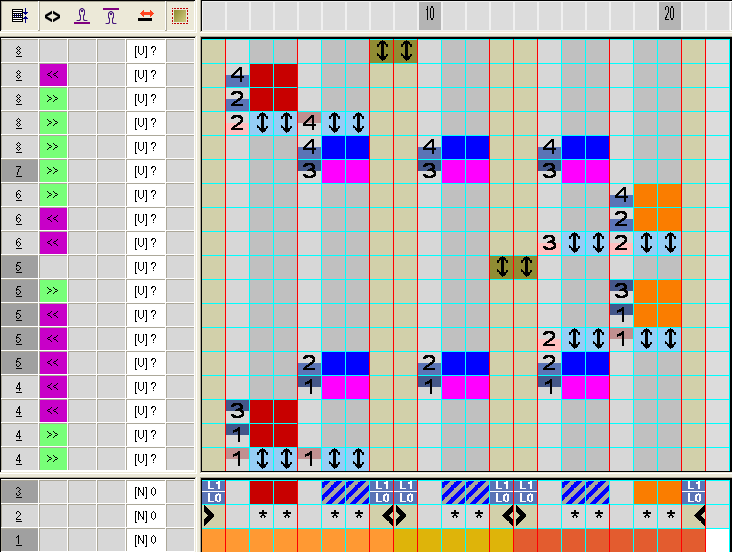
Example: CA_C37-3 areas 1:1:1
- 8
- Have Color Arrangements allocated from all the other k&w Arrangements and modify them.
- A5-2 tubulars
- B1-Type1 (no connection L0-L1)
- C11-3 areas 1:1:1 with gore (L0)