Set the specifications for the auxiliary take-down
An additional control column  is inserted for controlling the auxiliary take-down.
No specifications are set by default.
Enter specifications for the auxiliary take-down in the pattern:
- You insert the settings for the auxiliary take-down referred to knitting rows in the pattern state Basic pattern
 .
.
- 1
- Open the existing pattern and save it with a new name via the / menu.
- or -
Generate a new pattern. - 2
- In the Symbol View Basic place the cursor in the control column for the auxiliary take-down and press the right mouse button.
- The auxiliary take-down context menu appears.
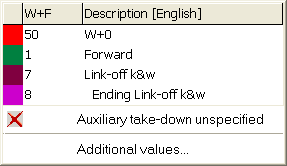
- The entries selected as favorites in the Auxiliary take-down table are displayed.
- An allocated auxiliary take-down value can be set to .
- 3
- Select the desired value for auxiliary take-down and enter it in the control column of the basic pattern.
- or -
Fill a selection.
With SETUP1 observe:
When creating patterns with the setup type 1 you need to watch out that in the control column auxiliary take-down and in the control column fabric take-down  are used the same indices.
Example: Fabric take-down WMF1 and auxiliary take-down W+F1