Change Machine Type / Replace Start
I. Change the used machine type:
- An existing pattern is open.
- 1
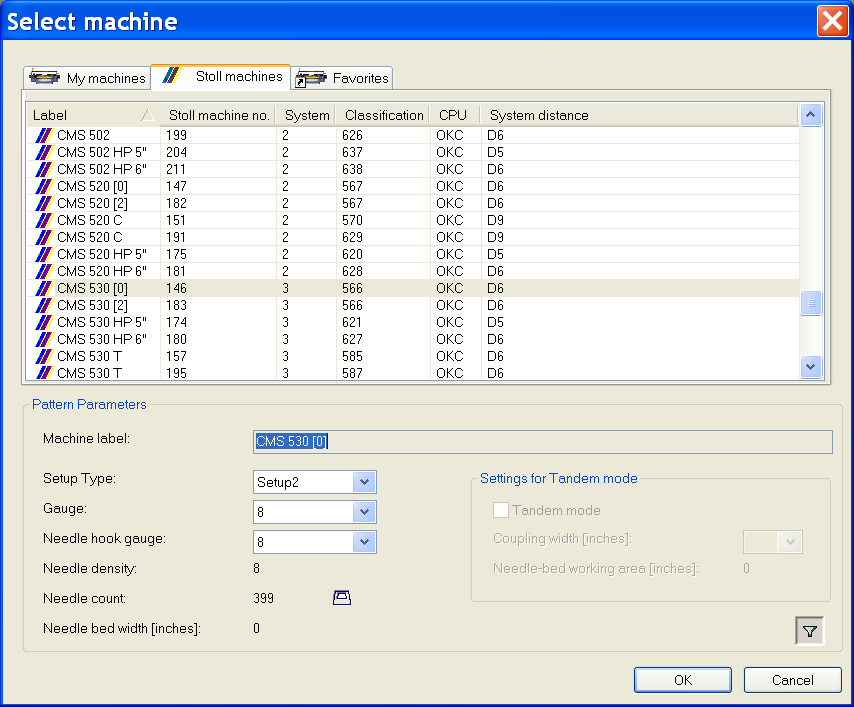
- Call up the Select machine dialog box with the / menu.
- 2
- Select the desired machine type from the corresponding tab:
- My machines
- Stoll machines
- Favorites
- 3
- In the Select machine dialog box under define:
- Setup Type
- Gauge
- Needle hook gauge
- 4
- When selecting the machine type Tandem set the desired specifications under .
- 5
- Confirm with OK.
Due to changes of the machine type, it can be necessary to change the start as well.
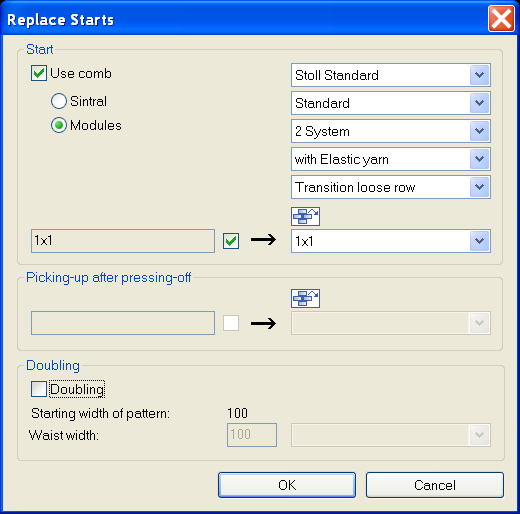
The M1plus opens automatically the Replace Starts dialog box.
II. Replace, insert or remove start:
- 1
- Via the menu call up .
- The Replace starts dialog box is opened.
- 2
- Select the desired Start.
Define the function with machines without comb.
- 3
- Confirm with OK.
You can also make these changes in the pattern state .