Length adjustment with multiple switchable cycles
The M1plus supports the creation of switchable cycles.
Several switchable cycles are automatically generated within a selected area.
I. Generate cycle for length control:
- 1
- Select the pattern rows in the symbol view, which shall be used for length control.
Example: Select an area of 34 pattern rows.
Select an even number of rows.
The height of a multiple switchable cycle has to contain a repeatable rhythm of knitting.
- 2
- Call up the Cycles dialog box and carry out the corresponding settings.
- 3
- Designate the cycle under .
- 4
- Allocate a cycle counter or a counter under .
- 5
- Set Multiple switchable cycle under .
- 6
- Define the number of pattern rows, which are to build the switchable cycles under at .
Example: Enter the number 6. - 7
- Enter 0 for the value under .
- The selected area will be divided into equal cycles with 6 rows.
A rest with less than 6 rows can result depending on the selection height.
- 8
- Confirm settings with Apply.
- The selected area will be divided into cycles with 6 pattern rows and will be displayed in the control column of the Symbol View.
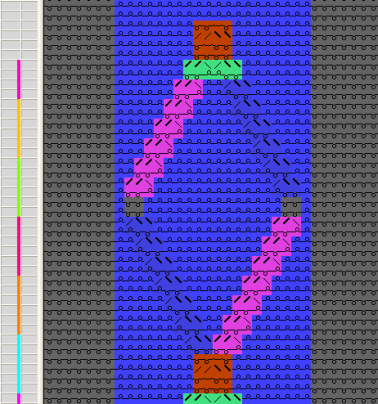
- 9
- Call up the Cycle table via Display cycles >>.
- The determined cycles are listed in the table.
You can modify the specifications in the cycle table by clicking on it, if necessary.
- 10
- Close the Cycles dialog box with OK.
- 11
- Close the cycle table with
 .
.
- The changes are applied without prompt.