Multi-piece knitting with CMS 822
Overview of the operating modes with CMS 822:
|
Possibilities of the operating modes | ||
|---|---|---|
|
Operating Mode |
Using the comb |
Number of possible fabric pieces |
|
Without tandem: |
Without comb |
1 - 4 |
|
With comb |
1 or 2 | |
|
With tandem |
Without comb |
1-4 per carriage |
|
With comb |
2 | |
I. Without Tandem - Multi-piece knitting with and without comb:
The editing steps have been described in the previous chapter.
|
Possibilities with normal operation (without tandem) | |||
|---|---|---|---|
|
System allocation per knitting area |
| ||
|
Start |
Configuration: |
processing | |
|
Without comb |
|
1 - 4 SEN |
|
|
With comb |
|
1 SEN = 2 Fabrics |
|
 :
:II. With tandem - Generate multi-piece pattern without comb:
The workflow of the CMS 822 corresponds to the workflow of CMS 933/922/422TC/433TC as tandem.
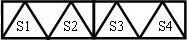
The knitting program is generated for the left carriage with knitting systems S1 and S2.
The needle selection is calculated internally for the left fabric and is transferred to the right fabric with the knitting systems S3 and S4.
- 1
- Generate new pattern.
- or -
Load the existing pattern as basic pattern . - 2
- Activate the
 checkbox and select the coupling width under when selecting the machine.
|
Tandem operation without comb | ||||
|---|---|---|---|---|
|
System allocation |
| |||
|
Start |
Coupling width |
Working width |
processing | |
|
Without comb |
42 " |
42 " |
| |
|
| ||||
|
| ||||
|
Start |
Coupling width |
Working width |
processing | |
|
Without comb |
44 " |
40 " |
| |
|
| ||||

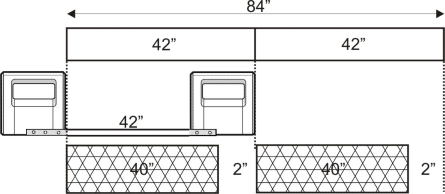
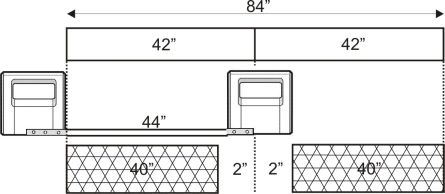
The distance of both the knitting areas must be enough to place the yarn carriers in use.
Take note of the double assignments of yarn carrier rails.
- 3
- Open the tab of the Configuration dialog box via the / menu.
- 4
- Position the to the left
 with a great working width.
 - 5
- Set the in the tab to 1.
- 6
- Start the technical processing with
 .
.
- The query appears.
- 7
- Confirm the query with OK.
- 8
- Call up the Sintral Check by
 .
.
III. With tandem - Generate multi-piece pattern with comb:
|
Possibilities with normal operation (with tandem) | ||||
|---|---|---|---|---|
|
System allocation per knitting area |
| |||
|
Start |
Configuration: |
processing |
Possible coupling widths: | |
|
With comb |
|
1 SEN = 2 Fabrics |
|
|
The two carriages function as one carriage with wide space between S2 and S3 with the system sequence
The machine works as a compact machine with comb but with wide coupled carriages.
This type of operation is called Sintral TANDEM-CCC.
- 1
- Generate new pattern.
- or -
Load the existing pattern as basic pattern .
The  checkbox may not be active when selecting the machine under .
|
Tandem operation with comb | |||
|---|---|---|---|
|
System allocation |
| ||
|
Start |
Coupling width |
Working width |
processing |
|
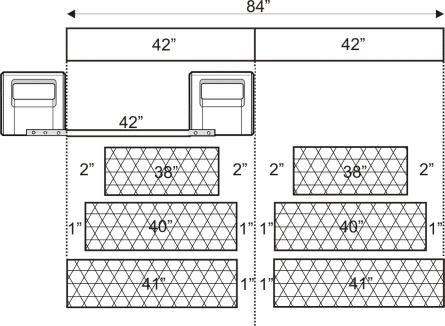
With comb |
42 " |
42 " |
|
|
| |||
|
Possible positions of the working width and the intermediate space | |||
|
| |||
|
Start |
Coupling width |
Working width |
processing |
|
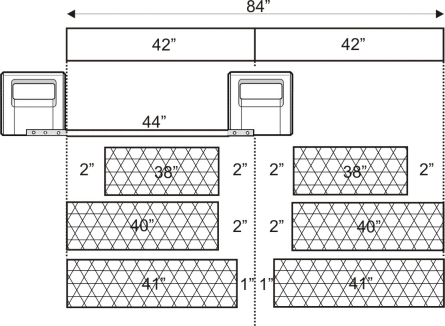
With comb |
44 " |
40 " |
|
|
| |||
|
Possible positions of the working width and the intermediate space | |||
|
| |||
- 2
- Select and
 when selecting the start.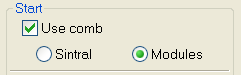
- 3
- Open the tab of the Configuration dialog box via the / menu.
- 4
- Position the to the left with a great working width.
- 5
- Set the in the tab to 1.
- 6
- Confirm input with OK.
- 7
- Start the technical processing for two pieces with
 .
.
- The Coupling width dialog box appears.
- 8
- Select the desired coupling width.
- 9
- Close the dialog box with OK.
- The technical processing for 2 pieces is carried out and the prompt appears.
- 10
- Confirm the query with OK.
- In the opened views are shown 2 pieces.
All yarn carriers, even for comb thread, draw thread and elastic thread will be doubled with the processing for two pieces.
- 11
- Call up the Sintral Check by .