Multi-piece knitting on machines without comb
I. Create and complete a pattern:
- 1
- Generate new pattern.
- or -
Load the existing pattern as basic pattern . - 2
- Open the Configuration dialog box via the / menu.
- 3
- Select the tab.
- 4
- Under enter the number of SEN areas and the desired by inches.
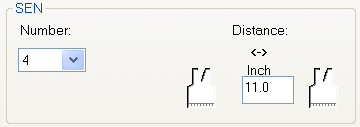
- 5
- Confirm input with OK.
- The Configuration dialog box is closed.
Machine type | Number of SEN areas | Distance between the SEN areas |
|---|---|---|
CMSWithout Comb | 1SEN 2SEN SEN 3 SEN 4 | Standard: 11 inch |
 :
:- 6
- Start the technical processing with
 .
.
- The query appears.
- 7
- Confirm the query with OK.
- 8
- Call up the Sintral Check by
 .
.
YG and SEN will be displayed in the Sintral according to Configuration.
II. Use different yarn carrier home positions in the different SEN areas:
In case of multi-piece knitting on machines without comb, the same yarn carrier home position is automatically calculated for all SEN areas.
- Pattern is load in the state of
 Processed Pattern.
- 1
- Call up the Yarn Field Allocation dialog box by
 .
. - 2
- Under select the desiredSEN.
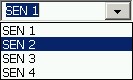
- 3
- Position the yarn carrier anew on the yarn carrier rails.
Proceed according to the same sequence for the other SEN areas, if necessary.
- 4
- Close the Yarn Field Allocation dialog box with OK.
- 5
- Call up the / menu.
- The query appears.
- 6
- Confirm the query with OK.
- 7
- Call up the Sintral Check by .