How to generate machine keys on the machine
How to generate a machine keys for OKC:
- The OKC machine is switched on.
- Operating system V_OKC_002.008.00x_STOLL (or higher).
- EVP Pattern Decryption is installed on the machine
- 69
- Call up the Sintral Editor with
 .
. - 70
- Call up the keys of the 2nd level with
 .
. - 71
- Start generating a machine key with

- The Select path for saving the encryption key input window appears.
- 72
- Select the desired path.
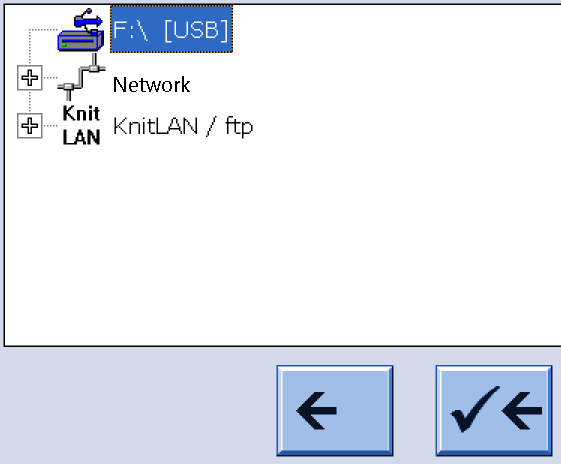
Enter speaking names to be able to recognize the machines to which it belongs by reading the machine name.
Avoid special characters \ / : ? < >|
Create at least one subdirectory for at least one machine group.
With speaking directory names in order to recognize the machine group by this name.
- 73
- Generate a machine key with
 and save it.
 - The machine key is available in the specified directory.
<Key name>.xml - 74
- If necessary, copy the <Key names>.xml into further subdirectories of the key store to create groups.
- 75
- In the Select path for saving encryption key input window you can specify the transfer to the key store:
- USB Memory Stick or other data carriers at the USB port of the machine
- Connected network drives
- KnitLAN / ftp
How to generate a machine keys for EKC:
- EVP Pattern Decryption is installed on the machine
 Senior Operator
 - Operating system V_EKC_001.001 (or higher).
- 76
- Open the tab.
 Configure Machine
 System Settings
  Data Transfer
 - 77
- Select Data Type.
 Sintral Crypto Key File
 - 78
- Specify the external save location.
 External Save Location
 - The Select External Folder entry window is displayed.
- 79
- Select the desired path.
Enter speaking names to be able to recognize the machines to which it belongs by reading the machine name.
Avoid special characters \ / : ? < >|
Create at least one subdirectory for at least one machine group.
With speaking directory names in order to recognize the machine group by this name.
- 80
- Generate machine key. Create Sintral Crypto Key File
- 81
- Save machine key.
 Export Data
 - The machine key is available in the specified directory.
<Key name>.xml - 82
- If necessary, copy the <Key names>.xml into further subdirectories of the key store to create groups.
More buttons:
Delete Sintral Crypto Key File
- Deletes the machine key file which enables to encrypt knitting programs in Sintral Crypto Tool.
- Only available if a Sintral Crypto Key File is available in the specified directory.
Export Data
- Copy the selected data to an external save location.
- Example
Copy existing Sintral Crypto Key File to a network drive to get it available for the Sintral Crypto Tool.