Generate Color Arrangement
I. Generating Color Arrangement and entering it:
- 1
- Select the pattern in the entire height.
- 2
- Click the
 button.
- The Color Arrangement Editor will be opened.
- 3
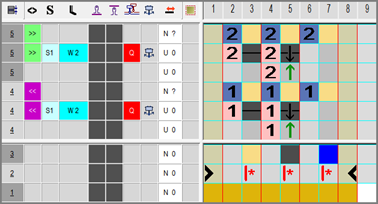
- Modify the Color Arrangement:
- Insert additional rows into the processing area of the weft yarn.
- Enter yarn color #2 and needle action Float at search color #31.
- Enter yarn color #2 and needle action Weft yarn / Transfer to front wiht float at search color #2 as well.
- Insert the corresponding reference row number for the additional rows in the reference column in the processing area
- Insert additional rows for transferring into the processing area.
- Enter needle action Transfer to rear at search color #2.
- Insert the corresponding reference row number for the additional rows in the reference column in the processing area
- Enter the
 symbol for with the setting in the
  control column.
 - Enter the
 symbol for weft yarn in the control column
  .
. - Enter the
 symbol in the control column.
 - Enter the system setting for weft yarn into the
 control column.
 - Weft yarn carrier runs before system S1
If necessary, enter index values in the Presser Foot Correction  control columns in order to make any necessary corrections of the presser foot on the machine afterwards.
- 4
- Close the Color Arrangement Editor with
 .
.
- The CA is saved and the color entry is entered in the
 control column.