Insert/Replace k&w Start
The k&w start will be inserted with the Cut-out shape Step of processing  .
.
When editing the first time, the Insert/Replace k&w Start dialog box appears automatically.
- 1
- Call up the Insert / replace k&w starts dialog box via the / menu.
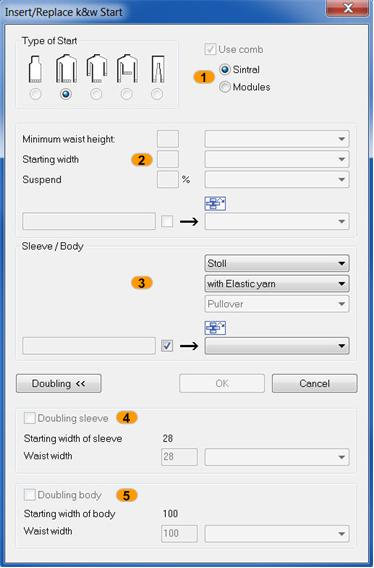
- 2
- Select start:
|
|
|
Function |
|---|---|---|
|
1 |
Type of Start |
Via the automatic shape detection the kw starts are enabled. |
|
Use Comb |
The comb thread must be used with kw patterns. | |
|
Sintral/Module |
Selection: Comb thread as module or Sintral function in the pattern | |
|
2 |
| |
|
Minimum waist height: |
Definition of the number of rows in the short sleeve start | |
|
Start width |
Definition of the stitch number with residual yarn with short sleeve and short body | |
|
Suspending |
Definition of the suspending row number with residual yarn | |
|
3 |
Selection of the k&w starts | |
|
4 |
Doubling sleeve |
Excess width in the sleeve start, compensation of the rib entry |
|
5 |
Doubling body |
Excess width in the body start, compensation of the rib entry |
 Start for Short sleeve or Short body
A kw start bust be inserted before further processing.
- 3
- Close the
 dialog window.