Generate Color Arrangement
I. Generating Color Arrangement and entering it:
- 1
- Select the pattern in the entire height.
- 2
- Click the
 button.
 - The Color Arrangement Editor will be opened.
- 3
- Modify the Color Arrangement:
- Insert additional rows into the processing area of the weft yarn.
- Enter yarn color #7 and
 Float needle action at search color #31.
 - Enter yarn color #7 and Float needle action at search color #2 as well.
- Insert the corresponding reference row number for the additional rows in the reference column in the processing area
- Insert additional rows for transferring into the processing area.
- Enter Transfer to rear needle action at search color #7 before the float.
- Enter Transfer to front needle action at search color #7 after the float.
- Insert the corresponding reference row number for the additional rows in the reference column in the processing area
- 4
- Make entries to the following control columns:
-
 control column:
 - Enter the S1 system specification for the weft yarn carrier in order to drive it by the S1 system.
- Specify S2 for the following enclosing by transfer
- Sequence of Technical Rows
 :
: - The
 symbol in the technical row with the weft yarn
 - The
 symbol in the technical row to enclose the weft yarn by knitting
 - Weft yarn presser foot
 :
: - The
 symbol in the technical row to enclose the weft yarn by transfer
 - Presser Foot Correction :

- Set a different ESCI index for each of both the carriage directions in those technical rows in which the weft yarn presser foot is active.
Result: 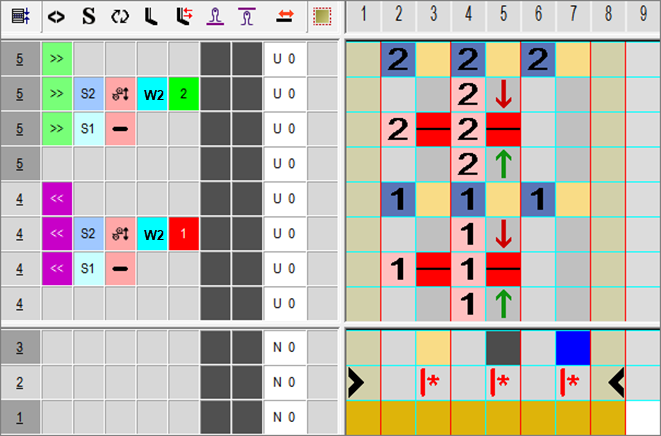
Enter index values in the Presser Foot Correction control columns in order to make any necessary corrections of the presser foot on the machine afterwards.
- 5
- Close the Color Arrangement Editor with
 .
.
- The CA is saved and the color entry is entered in the
 control column.