Split up the Knitting Program
Not necessary with OKC machines.
A pattern must be split:
- if the pattern size is in the limit area or too large for the machine memory .
- if the jacquard and Sintral lines exceed the permissible number of lines of the machine memory.
- if the setting Split pattern in any case is activated in the Split pattern (splitsintral.exe) dialog box.
I. Set the pattern memory in the Machine Explorer:
For machines with the computer type ST168, ST268 and ST468, the storage existing in the machine can be set on the M1plus.
- 1
- Open the Machine Explorer dialog box in the / menu.
- 2
- Choose the desired machine in / and select in the context menu.
- 3
- Select the newly generated machine under .
- 4
- Run the function in the context menu.
- 5
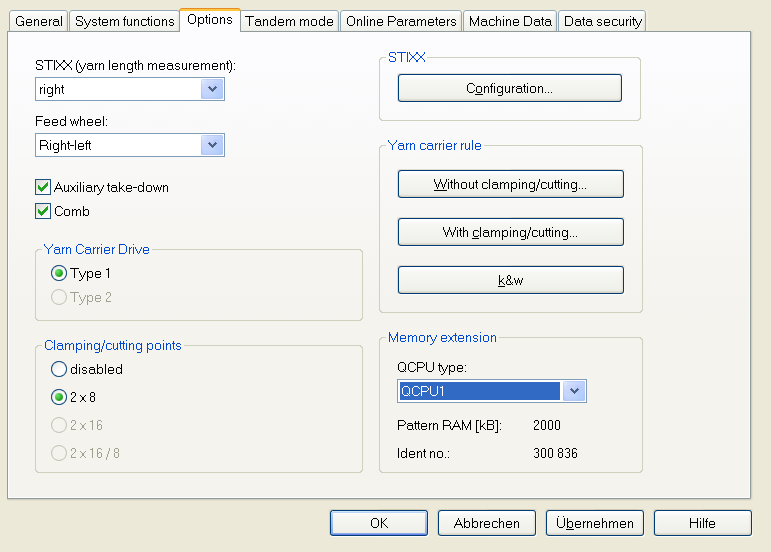
- Set the QCPU type in the Properties of CMS… dialog box under / .
- QCPU1: Memory capacity 2,000 kB
- QCPU2: Memory capacity 9,000 kB
II. Set automatically the markings for the splitting of the pattern:
- 1
- Generate the MC program after the
 step of processing .
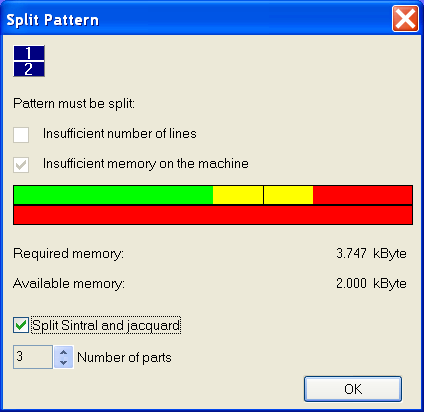
- The Split pattern dialog box appears.
- 2
- Activate the setting in the Split pattern dialog box.
- 3
- Select a number under .
- 4
- Start the process with OK.
- Markings are set in Sintral and jacquard (= number of parts), where the pattern is to be split.
Divided programs have the entry <<M1>> in the first program line.
II a. Split a pattern for the CMS Operating System ST168.0_30_03.001.001 or higher:
If the pattern is loaded into a machine with the computer type x68 and operating system ST168.0_30_03.001.001 or higher, the pattern can be loaded into the main memory of the machine.
The pattern will be split in the memory of the machine.
- 1
- Load pattern into the machine.
- or -
Extract pattern via the / and load it into the machine.
- If there are markings when loading the pattern, a sequence is automatically generated and loaded into the sequence mask.
- 2
- Start the sequence editor.
II b. Split a pattern for a CMS Operating System before ST168.0_30_03.001.001:
If the pattern is to be read in a machine with an operating system before ST168.0_30_03.001.001, you have to split the pattern and put it together to a sequence.
- 1
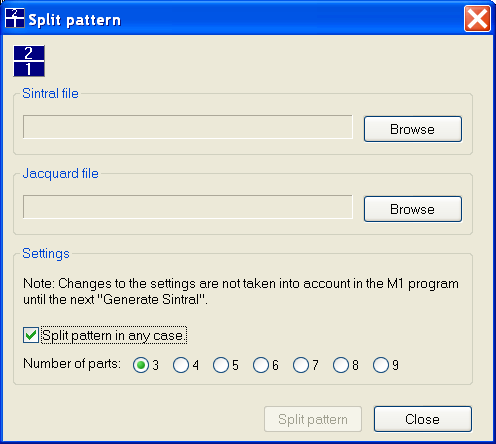
- Call up the program splitsintral.exe under the path C:/Program Files/Stoll/M1plus/Versionsnummer…/Bin.
- 2
- Set the path to the extracted Sintral and jacquard file with the Browse buttons.
- 3
- Select a number under .
- 4
- Start the process with the Split pattern button.
- Now the directory in which the pattern to be split is stored contains the following files:
Pattern name-1.sin / -2.sin / -3.sin, etc.
Pattern name-1.jac / -2.jac / -3.jac, etc.
Pattern name-1.set
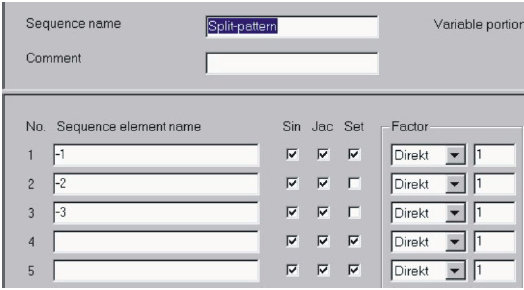
Pattern name-.seq
The split pattern is to be knitted as a sequence.
- 5
- Load the sequence into the machine.
- 6
- Start the sequence.
III. Start the Split pattern program manually.
For patterns, which, due to their size, do not require to split pattern it is possible to start the program manually.
- 1
- Call up the program splitsintral.exe under the path C:/Program Files/Stoll/M1plus/Versionsnummer…/Bin.
- 2
- Activate the Split pattern in any case checkbox
- 3
- Close the Split pattern program.
- 4
- Carry out the processing step .
- 5
- Continue as described under point IIb.