Position and cut-out the shape and expand the pattern
I. Position the shape:
- The shape with k&w Arrangements is located on the pattern after Open k&w shapes.
- 1
- Position the shape elements Sleeve and / or Body with collar on the motif with the
 symbol selected and the left mouse button pressed.
- or -
Select the desired shape element with the symbol selected.
Position the selected shape element with the arrow keys of the keyboard.
- or -
using the Tool properties dialog box
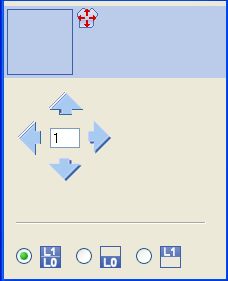
Settings in the Tool properties dialog box for the Drawing Tool:
|
Symbol |
Function |
|---|---|
|
|
Move front layer (L0) and back layer (L1) |
|
|
Move front layer (L0) only |
|
|
Move back layer (L1) only |


- 2
- Select the desired Pattern Presentations k&w:
|
Symbol |
Function | |
|---|---|---|
|
|
Display Pattern Cut-out |
k&w preview only possible in the processing step Result:
|
|
|
Display Pattern Folded out |
Presentation of the shape with shape attributes (narrowing, fade-out, aligning symbols) and sleeves folded out.
|
|
|
Display Pattern Collapsed |
Presentation of the shape with shape attributes without the Suspend symbols.
|


 : Allocation of CA and MA.

II. Cut-out the shape:
You can make pattern related settings in the Configuration k&w dialog box before cutting out.
- 1
- Cut out the shape with
 in the Steps of Processing toolbar.
- The k&w Options for Cut out dialog box appears.
- 2
- Confirm the settings in the dialog box with OK.
- The Insert/Replace k&w Start dialog box appears.
- 3
- Select the desired start.
- 4
- Confirm the settings with OK.
- The start module and the information of the k&w Arrangements will be applied to the pattern.
III. Expand the pattern:
- 1
- Expand the pattern with
 of the Steps of Processing toolbar.
- The Correction of Widening dialog box appears.
- 2
- Confirm with OK.
- The shape edges with the Widening attribute are corrected.
The bind-off module for the collar is inserted.