Correct Intarsia Yarn Carriers with YCI
After evaluating the braking values (correction related to the machine) sometimes an additional yarn carrier correction (correction related to the pattern) is necessary.
I. Commands
- Y-3A: KI n-m: Correction for Intarsia yarn carrier 3A un-swiveled
- Y-3A: K<I> n-m: Correction for Intarsia yarn carrier 3A swiveled
II. Enter the yarn carrier correction YCI in the control column:
In the control column  the YC index is entered in the entire pattern by default.
This YC index contains a table with all the yarn carriers used in the pattern without a correction value.
- The pattern is loaded in the basic
 pattern state.
- 1
- Display the control column in the symbol view.
- 2
- Place the cursor in the control column and call up the context menu with the RMB.
|
Yarn carrier correction index | ||
|---|---|---|
|
|
YCI |
20 indirect correction tables (index) are possible
|
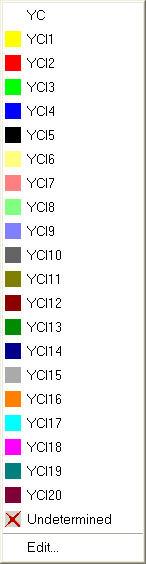
 : You can delete existing correction values with it.
- 3
- Select the desired index (color).
- 4
- Enter the selected index (color) in the desired area of the control column .
Enter different indices (colors) in to areas of the control column if different correction tables are necessary in the pattern.
- 5
- Complete the pattern.
- The yarn carriers are allocated to the rails.
Tables with Don’t Care (without correction values) are entered for each index in the Setup2 Editor.
You evaluate the correction values for intarsia yarn carriers on the machine and enter them in the Setup2 Editor under the corresponding YCIn.