Make settings for racking corrections
Racking corrections (VCI) are used in Stoll modules by default.
Enter settings for a racking correction in a local module:
All modules from the Module Explorer of Database used in the pattern will be saved as local modules with the pattern.
- The settings for a racking correction referred to transfer rows are to be entered into a local module in the Basic pattern
 pattern state.
- 1
- Open the existing pattern and save it with a new name via the / menu.
- or -
Generate a new pattern. - 2
- Select local module.
- 3
- Call up the context menu with the right mouse button.
- 4
- Call up .
- or -
Open the module double clicking. - 5
- Display the control columns for racking correction
 in the Module Editor
 - 6
- Place the cursor on the corresponding control column for the racking correction and press the right mouse button.
- The context menu Racking corrections (VCI) appears.
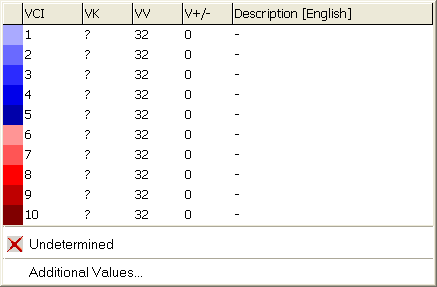
- The entries selected as favorites in the Racking correction table are displayed.
- An allocated racking correction can be set to .
- 7
- Select the desired racking correction from the display and enter it in the control column.
- or -
Select a racking correction value under and enter it. - 8
- Close the Module Editor with
 .
.
- The Module: XXX dialog box for applying the changes appears.
- 9
- Select the desired settings under for the data transfer.
- 10
- Close the dialog box with Yes.
- The settings are saved in the local module.
The entries in the transferring rows are only visible after the expand pattern step of processing.