Working with the Racking Correction Table
I. Call up the racking correction table and change the entry:
- The Basic Pattern
 state of pattern is loaded.
- 1
- Place the cursor on the control column for racking correction
 in the Symbol View and press the right mouse button.
- The context menu with the favorites from the Racking Correction Table appears.
- 2
- Place the cursor on the changed entry and press the right mouse button.
- 3
- Click in the context menu.
- or -
Select in the context menu of the control column Racking Correction (VCI).
- The Racking Correction Table appears.
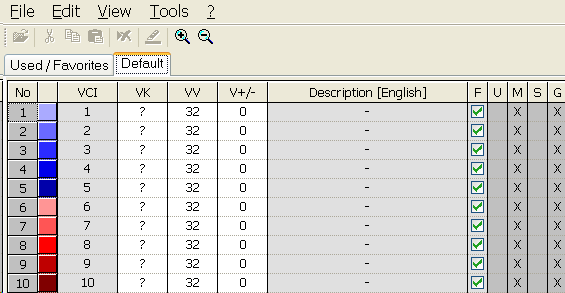
You can call up the Racking Correction Table also via the menu.
Designations in the Racking Correction Table
|
Column |
Function |
Specification |
Setting range |
|---|---|---|---|
|
VCI |
Racking correction functions |
Index |
1-50 |
|
VK |
Racking Correction |
|
A (-Z) |
|
Direction of correction |
Correction to the left |
< | |
|
Correction to the right |
> | ||
|
Correction value |
|
0-10 | |
|
Value undefined |
? | ||
|
VV |
Racking speed |
|
32-1 |
|
V+/- |
Overracking |
|
1-24 |
Additional racking commands will be displayed according to the used machine type.