Working with the Auxiliary Take-down Table
Call up the auxiliary take-down table and change the entry:
- Carry out changes in the Basic Pattern state of pattern.
- 1
- In the Symbol view place the cursor on the control column for auxiliary take-down
 and press the right mouse button.
- The auxiliary take-down context menu with the favorites from the Auxiliary take-down table appears.
- 2
- Place the cursor on the changed entry and press the right mouse button.
- 3
- Click in the context menu.
- or -
Select in the context menu of the Auxiliary take-down control column.
- The Auxiliary take-down table appears.
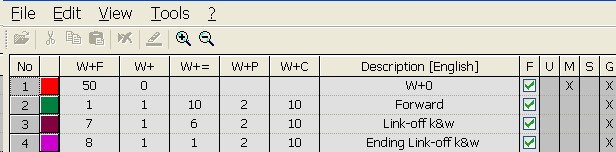
You can call up the Auxiliary take-down table via the menu as well.
Designations in the auxiliary take-down table
|
Column |
Meaning |
|---|---|
|
No. |
Consecutive numbering of the entries |
|
Color |
Color of entry |
|
W+F |
Index for the indirect allocation of the auxiliary take-down value |
|
W+ |
Open or close the auxiliary take-down |
|
W+= |
Speed of auxiliary take-down |
|
W+P |
Value for the contact pressure of the auxiliary take-down |
|
W+C |
Specification of the system number for the auxiliary take-down control |
|
Description |
Comments referring the entry |
|
Status columns |
Display the status of the entry |