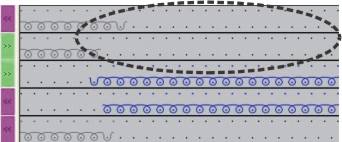
Global settings in configuration:
I. Make global settings for Intarsia in the GlobalParameters dialog box:
- No pattern may be open.
- 1
- Open the GlobalParameters dialog box with the / menu.
- 2
- Select the desired template for creating your one file under .
- 3
- Select another machine type and / or gauge if necessary.
- 4
- Enter new file name if necessary.
- 5
- Select the saved file under .
- 6
- Open the file by the Open user-defined file button.
- The GlobalParameters... dialog box appears.
- 7
- Click the Default button under .
- The Configuration dialog box will be opened.
- 8
- Make the desired settings in the tab.
- 9
- Confirm the settings as default with Apply or OK.
- 10
- Close the GlobalParameters dialog box with
 .
.
- The specifications will be saved and displayed as pattern related settings in the Configuration dialog box.
The file is saved to the Private folder under D:/Stoll/M1plus/<Version>/ConfigData/Private.
The file saved to the Private folder will be used when creating a pattern.
Setting options in the Intarsia tab:
|
Section | Function | ||||
|---|---|---|---|---|---|
Knitting out with a number of pattern rows of | |||||
| List field | Enter the number of pattern rows from which the knitting-out is to be carried out. | |||
Knitting in with a number of pattern rows of | |||||
| List field | Enter the number of needles, from which the knitting-in is to be carried out.
| |||
Intarsia / gore binding | |||||
|
| The binding will be generated after knitting. | |||
| The binding will be generated before knitting. | ||||
List field | Select a module from the Technical / Intarsia border processing / Binding module group. | ||||
Border Processing | |||||
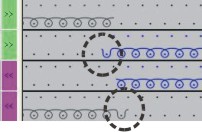
| Feed | If the step on the edge of a color area from one row to the next is greater than specified in the input field, the thread is brought to the start of the following color row by the selected feeding module. | |||
Reduce | The stepping at the edge of the color area (from one row to the next) is reduced to the , if necessary. | ||||
Allowed Stepping | Number of needles by which the color area on the edge may be graded.
| ||||
Valuate braking distances for Intarsia yarn carriers | |||||
|
| Adjusting program will not be included as function in to Sintral. | |||
| Adjusting program will be included as function in to Sintral. | ||||
| |||||
| List field |
| |||
Knitting-in | Make the desired settings for knitting-in the Intarsia yarn carriers | ||||
Knitting-out | Make the desired settings for knitting-out the Intarsia yarn carriers | ||||
Use only normal yarn carriers | |||||
|
| The Intarsia programs are knitted with normal yarn carriers. | |||
| The Intarsia programs are knitted with Intarsia yarn carriers. | ||||
Tuck structure with float jacquards above a distance of (needles) | |||||
| List field | Specification of the maximum distance in needles when knitting a float Jacquard
| |||
Net Pick-up | |||||
List field | Selection of the module for net pick-up | ||||
Starting before Jacquard (rows) | Specification of the quantity of rows for inserting the selected module (net pick-up) | ||||
|
| If the pattern requires a net pick-up of one needle only, this is carried out. | |||
| If the pattern requires a net pick-up of one needle only, this is not carried out . | ||||
multi gauge transition coarse/fine | |||||
| List field | Select module from the Technical / MG-Transition coarse-fine module group. | |||
Knitting-in / Knitting-out | |||||
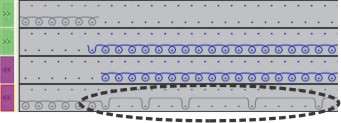
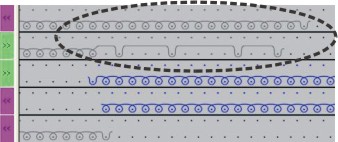
| With knot | A knot as binding is used. | |||
Binding | A module from the module group is selected. | ||||
Feeding | A module from the Technique / Intarsia Knit-in / Feeding module group is selected. | ||||
 : In case of an inferior row number, the yarn carrier remains in the pattern.
 <<
<< 


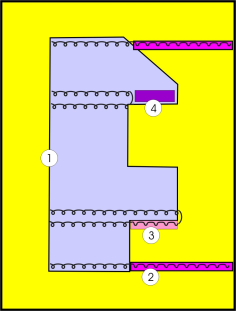
II. Effect of the settings when creating an Intarsia pattern:
|
| No. | Section | Presentation |
|---|---|---|---|
| 1 | Intarsia / gore binding |
|
2 | Knitting-in |
| |
3 | Border Processing |
| |
4 | Border Processing |
|