Multi-piece knitting on machines with comb
Rules for two-piece knitting with comb:
- For the start
 is to be selected.
 - Modules
- Sintral
- Do not use width cycles within the pattern
- Consider the total width and the distance between the fabrics
- The pattern must have a start
Create two piece pattern:
- 1
- Generate new pattern.
- or -
Load the existing pattern as basic pattern .
Watch out the number of yarn carriers used!
- 2
- Expand the pattern with the
 button of the Steps of Processing toolbar.
 - 3
- Open the Configuration dialog box via the / menu.
- 4
- Select the tab.
- 5
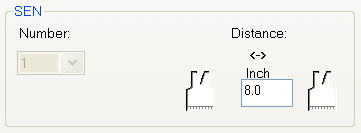
- Enter the desired under by inches.
|
Machine type |
Number of SEN areas |
Distance between the SEN areas |
|---|---|---|
|
CMSWith Comb |
No entry possible. |
Standard: 11 inch |
 : SEN = needle bed
- 6
- Confirm input with OK.
- The Configuration dialog box is closed.
The specifications in the configuration can also be set in the Basic Pattern.
- 7
- Carry out the technical processing for two pieces with the
 button.
- The Yarn field allocation dialog box appears.
The yarn carriers for the second piece are automatically allocated to the yarn carrier tracks as far as possible.
- Yarn carriers for the left fabric piece on the left side of the machine
- Yarn carriers for the right piece on the right-hand side of the machine
- Exception:
The yarn carrier for the comb thread is used for both pieces.
- 8
- Allocate the yarn carriers not yet allocated automatically to the yarn carrier rails manually.
Two pieces will be displayed with the specified distance in the view presented.
- 9
- Call up the Sintral Check by
 .
.