Draw basic pattern and define plating colors
I. Draw motif and define plating colors
- 1
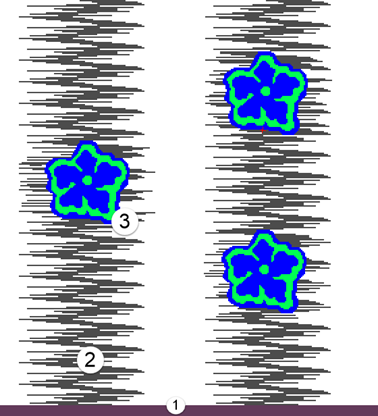
- In the basic pattern draw-in the desired motif with further yarn colors:
- Exchange yarn color #31 to yarn color #1
- Yarn color #2 for the area of Stoll-Ikat-plating
- Yarn color #3 and #4 for the area of inverse plating
|
| |
1 | 1x1 Start |
2 | Area of Stoll-Ikat-plating® |
3 | Area of inverse plating |
- 2
- Open the Plating dialog box with
 .
.
The in the Configuration / Further Setting dialog box are used to create new plating colors.
The i marking will automatically be applied to the new colors by selecting  Stoll-ikat plating®.
- 3
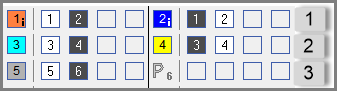
- Create the following plating colors:
- 2 plating colors for the area of Stoll-ikat plating® with the i marking.
- 2 plating colors for the area of inverse plating without marking
- 1 plating color for the start without marking
|
No. | Plating Colors | Use |
|---|---|---|
1 | P1 (orange) | Combination plating colors for the area of Stoll-ikat plating®
|
P2 (blue) | ||
2 | P3 (light blue) | Combination of plating colors for the area of inverse plating |
P4 (yellow) | ||
3 | P5 (grey) | Plating color for the start |
 : When creating the plating colors for Stoll-ikat plating ® you have to allocate type (i) to the plating color.
- 4
- Right click on the corresponding plating color.
- 5
- Select the item of the context menu.
- The plating color is indicated by the i symbol.
All plating colors will get the i marking if Stoll-ikat plating® is activated in / / Further Settings tab.
Meaning, that you have to cancel the marking of the colors for inverse plating.
- 6
- Right click the corresponding yarn color of a plating color combination.
- 7
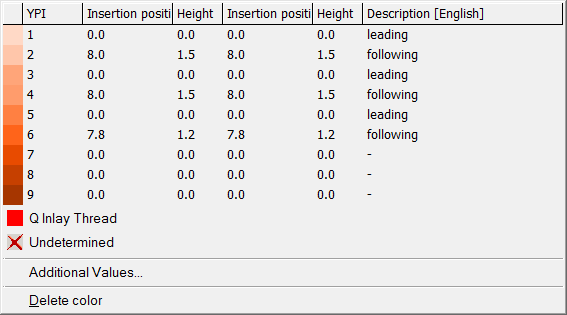
- Select the desired YPI index from the table and allocate it.
|
No. | YPI Index |
|
|---|---|---|
1 | YPI 1 + YPI 2 |
|
2 | YPI 3 + YPI 4 | |
3 | YPI 5 + YPI 6 |
- 8
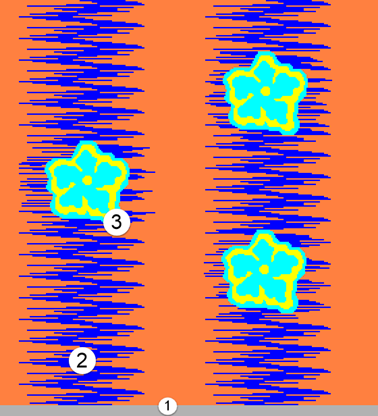
- Exchange the yarn colors in the basic pattern with the corresponding plating colors via the
 drawing tool
|
| |
1 | Plating color P5 |
2 | Plating color P1 + P2 |
3 | Plating color P3 + P4 |
Stoll-ikat plating ®
针对Stoll-ikat plating®,一个系统中每个颜色变化每个花型行需要用到两个添纱色(=一个添纱色组合)。
对于Stoll-ikat plating®,在每个系统可以使用一个不同添纱色组合。
在一个图案行中允许最多30个位置变化,颜色变化之间的距离应为2英寸(1.0 m / s)。