W Presser Foot
|
|
Make settings for the weft yarn presser foot. Machines that are equipped with presser feet, are marked with W. In Configuration, Machine Attributes tab select the type for every system in the Presser Foot section. If you insert a weft yarn carrier Qw, it has to be activated in Configuration, Machine Attributes tab. |


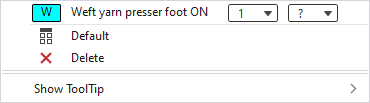
In the context menu you have the following options:
|
|
Activate weft yarn presser foot. The following options are available: The following options are available for every selected type: |
|
|
Sets the setting on Default.
|
|
|
Deletes the entry. |
|
Show ToolTip |


 Applies the entry of the default setting from the header row.

Further information:
- Types of Presser Feet
- Presser Feet for Weft Yarn and Knitting-in
- W Machine - Weft Yarn Carrier Qw
- W Machine - Weft Yarn Carriers Qt1 Qt2 Qt3