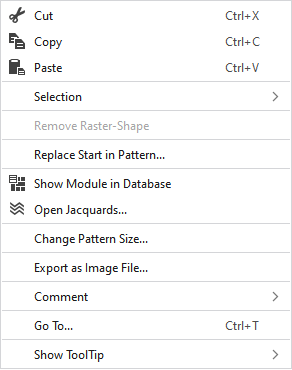
Context menu of the pattern layer
Make the following settings in the context menu of the pattern layer:
|
|
Deletes the content of the selection, copies it to the clipboard and takes it to the cursor (cursor attributes). | |
|
|
Copies the content of the selection to the clipboard and takes it to the cursor (cursor attributes). | |
|
|
Takes the content of the clipboard to the cursor (cursor attributes). | |
|
Selection |
Create Jacquard... |
I. Generate a Jacquard area in the selected area. |
|
|
Create a pattern element from the selection. Creates a new pattern element from the existing selection and adds it to the 'Pattern Element' tool window. | |
|
Select |
The functions of the menu bar Selection are also available in the context menu. | |
|
Protect |
A selection can be protected from interventions. | |
|
Remove Raster-Shape |
If a .spf pattern with raster-shape is imported, this function can be used to remove the raster-shape from the pattern.
| |
|
Replace Start in Pattern... |
Call-up the Replace Start dialog box in order to select a start for the first time or to replace one. | |
|
|
Shows the module at the cursor position in the database. | |
|
|
Opens the tool window Jacquards and shows in it the Jacquard of the cursor position. | |
|
Change Pattern Size... |
Opens the dialog box where you can change the height and width of the pattern. | |
|
Export as Image File... |
Save the design view off the whole pattern as image file. | |
|
Comment |
Place a pin, comment, or graphic anywhere in the pattern. | |
|
Go To... |
Opens the Go To dialog box. | |
|
Show ToolTip |
Make settings for the tooltip. | |


 You cannot edit a raster-shape in
