Raster-Shape
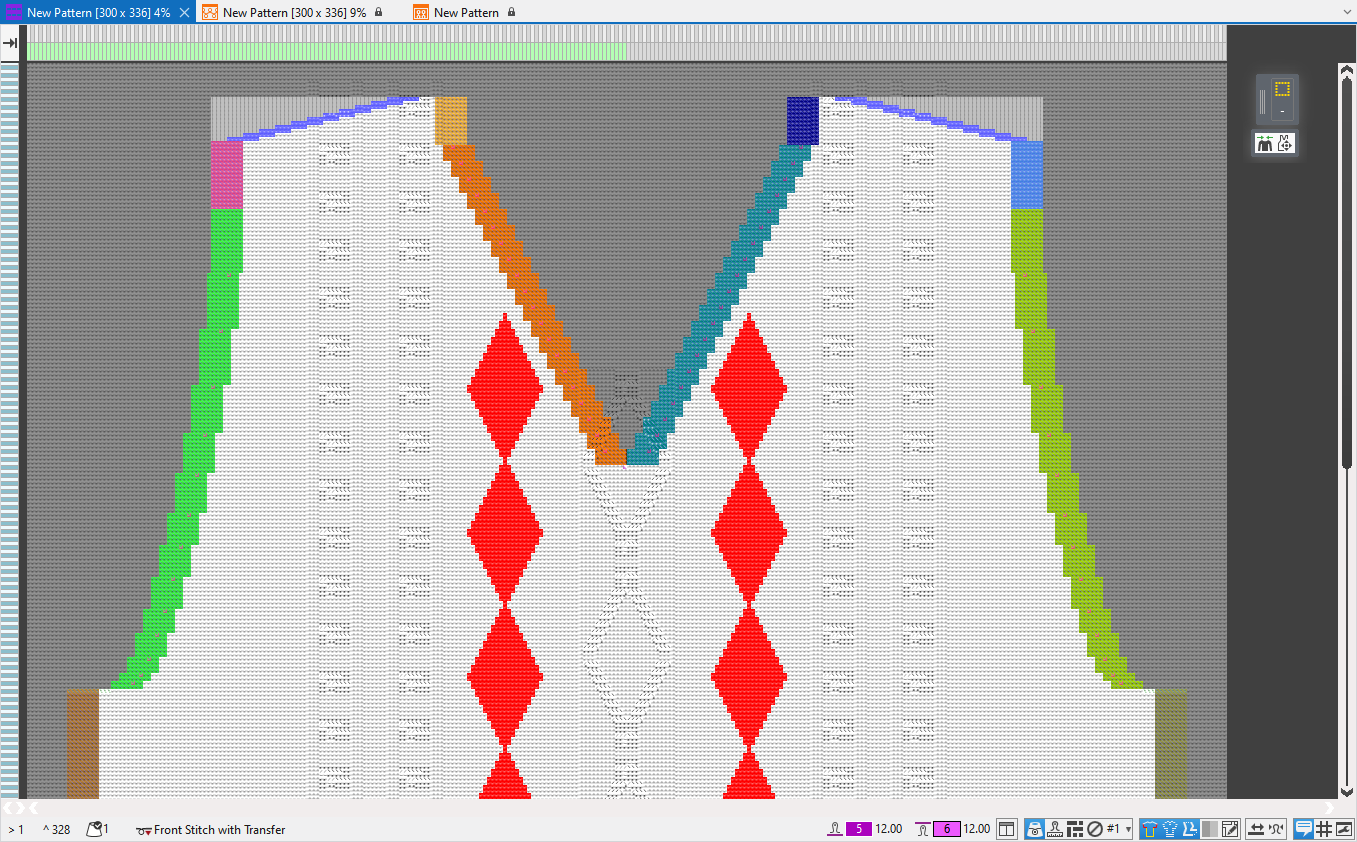
Beside the lined shape and the dimensioned shape there is also the possibility to create a shaped pattern using the raster-shape.
- Draw the raster-shape on the pattern manually.
- - or -
- Position the shape on the pattern and convert it to the raster shape.
For drawing and editing the raster-shape:
- Shape Symbols of the Şekil sembolleri tool window
- Shape Edges of the Şekil kenarları tool window
- Çizim aracı
- Functions of the context menu
- Modules of theKnit Explorer for:
- Soluklaştırma
- Reglan
- Artırma
- Ramayözleme
Status Bar
In the status bar of the raster-shape you can make the following settings for the representation:
Draw Manually
Some tips to draw manually:
Disable background and foreground
To draw manually it is very useful to set the view in the status bar to  Ön planı devre dışı bırak and Arka planı devre dışı bırak.
This way the pattern is hidden and the raster-shape can be edited more easily.
Cursor Attributes Window
In the Cursor Attributes window you can find some drawing tools developed specially for the raster-shape that considerably facilitate the editing of the shape edges.
Shape Symbols
In the shape symbols you can find beside the modules, all attributes that you need to draw in the raster-shape.
Shape edges and shape markings can be found in the drop-down menu of the corresponding shape symbol.
Shape symbols can also in addition be selected and drawn-in using the CTRL key.
Drawing Tool Çoklu kopya
All drawing tools from the menu bar are available to edit the raster-shape.
The Çoklu kopya drawing tool can be especially helpful.
With repetitions you can create the shape edges quickly.
Add Missing Shape Symbols
- You can also draw the shape as a contour with the
 Şekil dahilinde and
  Şekil dışında attributes.
 - Or load the contour as a two-colored image file.
And assign the two color areas the Şekil dahilinde and Şekil dışında attributes. - Then call up the Eksik şekil simgelerini tamamla... function in the context menu.
- In the Eksik şekil simgelerini tamamla tool window you make the settings for the shape edges.
- Clicking on Generate shape symbols the shape edges with the shape attributes are determined and drawn-in automatically.
- Add Missing Shape Symbols
- Image Import
Create from a shape
It can be very helpful to use a Çizgi kesimi or a Ölçülendirilmiş kesim as a basis for the raster-shape.
Position the desired shape on the pattern and click on Kesimi kılavuz şekline dönüştür
in the context menu.
The raster-shape appears according to the positioned shape and can then be edited manually.
In the context menu you have the following options for the editing of the raster-shape:
Şekil kenarları Tool Window
The created shape edges can be selected in the Shape Symbols tool window to draw.
To edit the shape edges or create new ones, open the docked Şekil kenarları
tool window.
In the upper area you make in the table the settings for the listed shape edges.
In the lower area you can find and replace raster-shape data.
Kalıp İşaretleri Tool Window
In the docked Shape Markings tool window, you can assign different knitting elements at any desired point of the shape.