Configuration
You can make settings for the current shape file on this tab.
You can call up the Configuration tab by Configuration on the backstage view.
Shows the basic shape type of the current shape file.
- Click this button in order to change the basic shape type.
 Change a Dimensioned Shape (dialog box)
Measure Units
-
Measure Unit
Select the measure unit of the reference measure of the stitch density: -
 cm
cm
-
Inch
-
Reference Unit of Stitch Density
Select the value of the reference measure of the stitch density
For example: cm
cm -
Specifying the Stepping
-
 Hand-Knitting (Courses)
All values for vertical measures will be set in courses, i.e. 2 stitch rows. -
 Hand-Knitting (Courses)
All values for vertical measures will be set in single stitch rows. What's About Hand Knitting?
Deviation of points in the dimensioning view
Stitches
-
Measure Unit
-
Stitches
-
cm or inch
Measure unit corresponding to the optionscm or Inch set above.
-
Show with deviation greater than:
-
Vertical

-
Horizontal
Shows deviating shape points in red.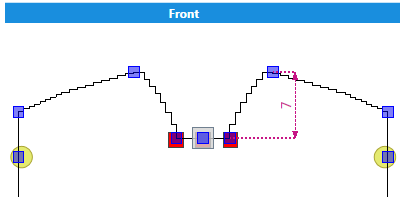
The displayed deviation of shape points is for your information.
Minor deviations does not affect the knitted result.
Default Settings
Default settings for widening, narrowing, fading-out, binding-off and stepping.
-
Narrowing
-
Module

-
Width
-
Look
-
Multi-step Narrowing
-
Module
-
Width
-
Look
Select the position of the narrowings: above
above underneath
 -
Widening
-
Module
-
Width
-
Fading-out (for body and sleeve only)
Not valid for collars, trimmings or straps -
Module
-
Width
-
Binding-off
-
From a Step Width of
Enter the minimum step width requiring binding-off. You can define specific knitting elements for binding-off within the properties of
the line.Line Properties
You can define specific knitting elements for binding-off within the properties of
the line.Line Properties
How to Proceed: